Let Claude (or any LLM) actually watch a video — scene-aware, deduplicated frames + transcript, from a URL or local file. Runs locally, MIT.
Python688341 issuesMIT License
创建于 2026-06-30最近推送 2026-07-03
项目说明
claude-real-video
Let Claude — or any LLM — actually watch a video.
Same 58-second clip: fixed 1 fps sampling = 58 frames. crv keeps the 26 that actually differ — and --grid packs them into 3 contact sheets. Fewer tokens, nothing missed.
Most AI tools don't really see a video. Paste a YouTube link into ChatGPT and it
reads the transcript, not the picture. Claude won't take a video file at all.
Even Gemini, which can read video natively, has to send it up to Google and
samples frames at a fixed interval (1 fps by default), so fast cuts slip past.
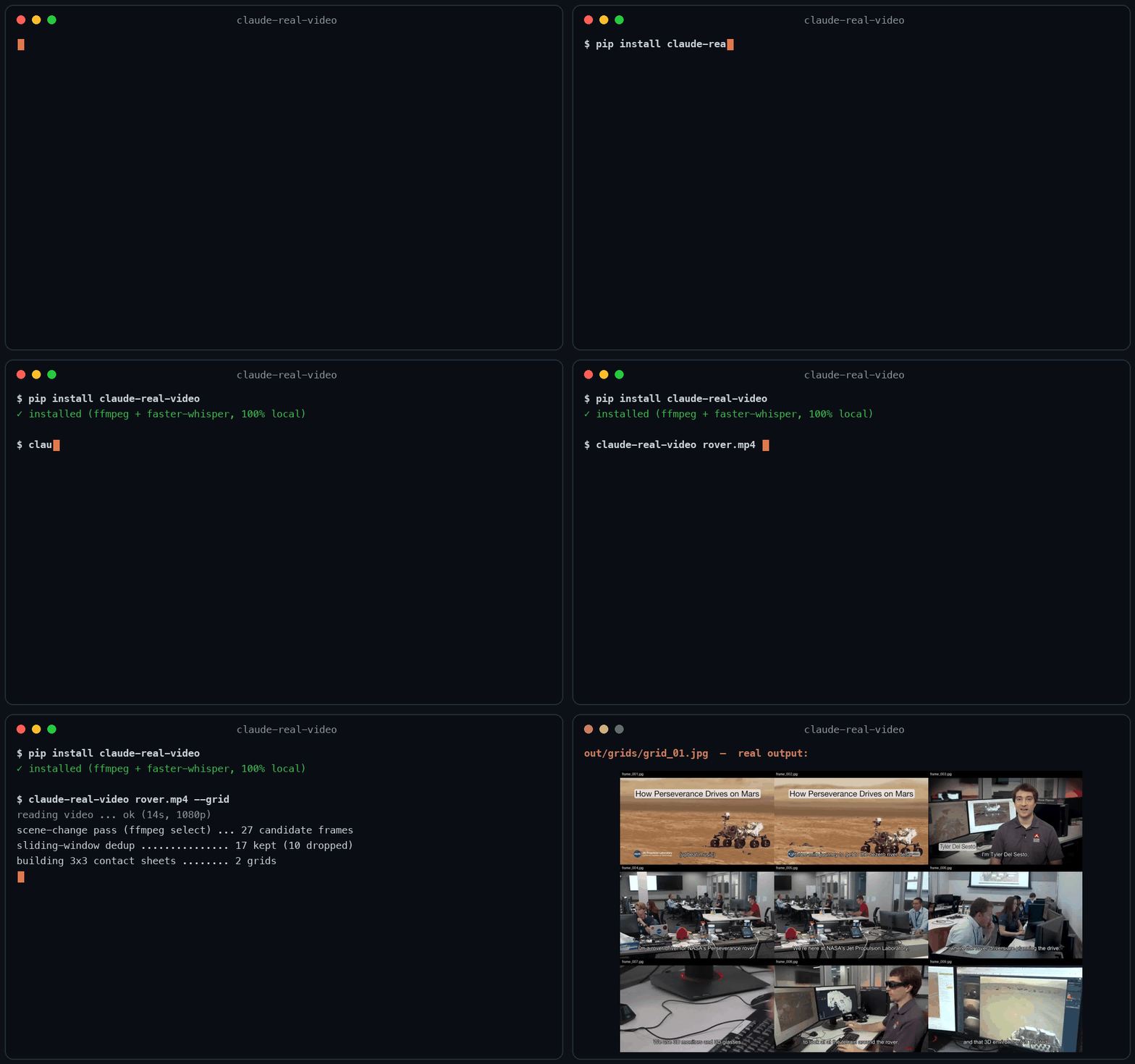
claude-real-video does it differently, and locally: point it at a URL or a
file, and it pulls the frames that actually matter (every scene change, not a
fixed quota), throws away the near-duplicates, transcribes the audio, and hands
you a clean folder any LLM can read. All the processing happens on your own machine — what gets sent anywhere is only the frames/text choose to paste into an LLM afterwards.
Then just paste a video link into Claude Code and ask about it.
New in 0.3.0 — tell it why you're watching, and keep what it finds:
crv "https://youtu.be/..." --why "find the pricing strategy" --kb ~/notes
--why makes the analysis focus on what you care about instead of a generic summary;
--kb saves the result as a dated note in your own notes folder, so it doesn't die in crv-out.
Why not just sample frames?
Most "let an LLM watch a video" scripts (and Gemini's own pipeline) grab frames
at a fixed interval — e.g. one per second. That over-samples a static
screencast and under-samples a fast-cut reel. claude-real-video is smarter:
fixed-interval sampling
claude-real-video
Frame selection
every N seconds
scene-change detection + density floor
Repeated shots (A-B-A cuts)
sent again every time
sliding-window dedup sends each shot once
Static slide (10 min)
~600 near-identical frames
collapses to 1 (dedup)
Fast-cut reel
misses frames between samples
catches each visual change
Audio
often ignored
Whisper transcript w/ language detect
Where the processing happens
often in someone's cloud
on your machine (you choose what to share with an LLM afterwards)
Input
usually local file only
URL (yt-dlp) or local file
You feed the model fewer, more meaningful frames — cheaper context, better
understanding.
ffmpeg / ffprobe are used for frame extraction and audio, and aren't
pip-installable. Install them once:
OS
command
macOS
brew install ffmpeg
Linux
sudo apt install ffmpeg (or your distro's package manager)
Windows
winget install Gyan.FFmpeg — or choco install ffmpeg — or download a build and add its bin\ folder to your PATH
Verify it's on your PATH:
ffmpeg -version
Transcription uses the whisper CLI (installed by the [whisper] extra, or
pip install openai-whisper). Whisper also relies on ffmpeg.
Works on macOS, Windows, and Linux — Python 3.10+.
Usage
# A YouTube / Instagram / TikTok / ... link
crv "https://www.instagram.com/reel/XXXX/"# A local file, English transcript, output to ./out
crv lecture.mp4 -o out --lang en
# Frames only, no transcription
crv clip.mp4 --no-transcribe
# A login-gated video (your own / authorised use): pass a Netscape cookie file
crv "https://..." --cookies cookies.txt
python -m claude_real_video ... works as an alias for crv too.
Options
flag
default
meaning
-o, --out
crv-out
output directory
--scene
0.30
scene-change sensitivity (lower = more frames)
--fps-floor
1.0
at least one frame every N seconds
--max-frames
150
hard cap on total frames
--lang
auto
Whisper language (en, zh, auto, ...)
--dedup-threshold
8
% of pixels that must change for a frame to count as new; higher = fewer frames
--dedup-window
4
compare against the last N kept frames — a shot the model already saw doesn't come back after a cutaway (1 = consecutive-only)
--report
off
keep dropped frames in ./dropped + write report.html visualising every keep/drop decision
--no-transcribe
off
skip audio
--keep-audio
off
also save the full soundtrack (audio.m4a) so audio models can hear it
--why
–
why you're watching, e.g. --why "find the pricing strategy" — written into MANIFEST.txt so the model analyses with that lens instead of a generic summary
--kb
–
also save the analysis as a dated markdown note into this folder (your Obsidian vault, notes dir, ...) — so it joins your knowledge base instead of dying in crv-out
--cookies
–
Netscape cookie file for login-gated sources
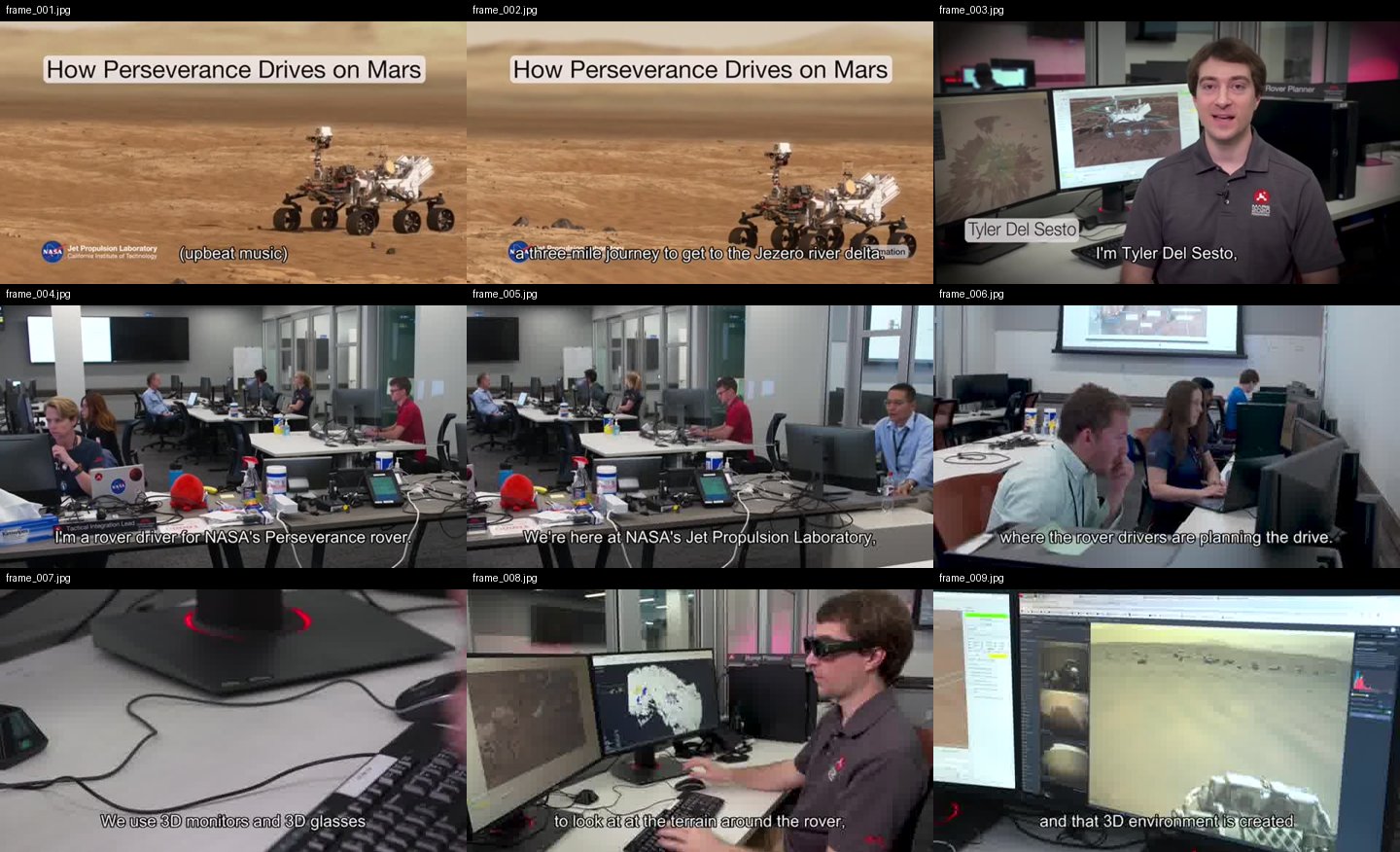
What --grid output looks like
One contact sheet = nine consecutive keyframes, in order, filenames on each cell — the model reads a sequence, not scattered stills:
Use it from Python
from claude_real_video import process

r = process("https://youtu.be/...", "out", lang="en")
print(r.frame_count, r.transcript_path)
How it works
Fetch — yt-dlp for URLs (optional cookies), or copy a local file.
Extract — one chronological ffmpeg select pass grabs every scene change
plus a density floor (at least one frame every --fps-floor seconds), so
fast cuts and slow screencasts are both covered.
Dedup — real pixel difference (downscaled RGB, not a perceptual hash — hashes
go blind on flat colours and equal-luma hue changes) against a sliding window
of the last --dedup-window kept frames, so an A-B-A cutaway doesn't re-send a
shot the model has already seen. --report writes report.html showing every
keep/drop decision with its diff %, for tuning.
Text — if the video already has subtitles (a sidecar .srt/.vtt next to a
local file, or an embedded subtitle track), those are used as the transcript —
faster and more accurate than re-transcribing. Only when there are no subtitles
does it fall back to Whisper on the audio (skipped cleanly if there's no audio).
Audio(optional, --keep-audio) — save the full original soundtrack
(audio.m4a: music + speech + effects, copied losslessly when possible). The
transcript only has the words; the audio file lets a model that can listen
(Gemini, GPT-4o, …) actually hear the music and tone.
Manifest — MANIFEST.txt summarises everything for the model.
So the model can see (key frames), read (transcript) and — with --keep-audio —
hear (full soundtrack) the video. The transcript is plain text any model can read;
the tool doesn't burn subtitles into the video — burning is a presentation choice,
not something needed to make a video AI-readable.
Notes
Only download content you have the right to. The --cookies option is for
your own, authorised access — don't ship credentials in a repo.
Re-running overwrites the output directory.
crv Pro — understand how a video was shot
The free version tells your AI what's on screen. crv Pro tells it how it was shot — and why it works. Camera moves, editing rhythm, action bursts, plus a one-flag --breakdown report: hook analysis, pacing curve, camera language, Reels-algorithm lens, and a rubric your own LLM completes into a full video teardown.
This free tool tells an LLM what is on screen. A stack of keyframes can't tell it how the video moves — the camera work and the pacing.
crv Pro adds a --motion pass on top of everything here:
Camera-move classification — every shot labelled static / pan / tilt / zoom / handheld (verified against ground-truth footage)
Editing rhythm — shot list, cuts per minute, and how pacing shifts across the video
Action bursts — high-motion shots get 0.2s-apart frame sequences so the model reads movement, not guesses