frp is an open source project with its ongoing development made possible entirely by the support of our awesome sponsors. If you'd like to join them, please consider sponsoring frp's development.
If you're looking for a meeting recording API, consider checking out Recall.ai,
an API that records Zoom, Google Meet, Microsoft Teams, in-person meetings, and more.
What is frp?
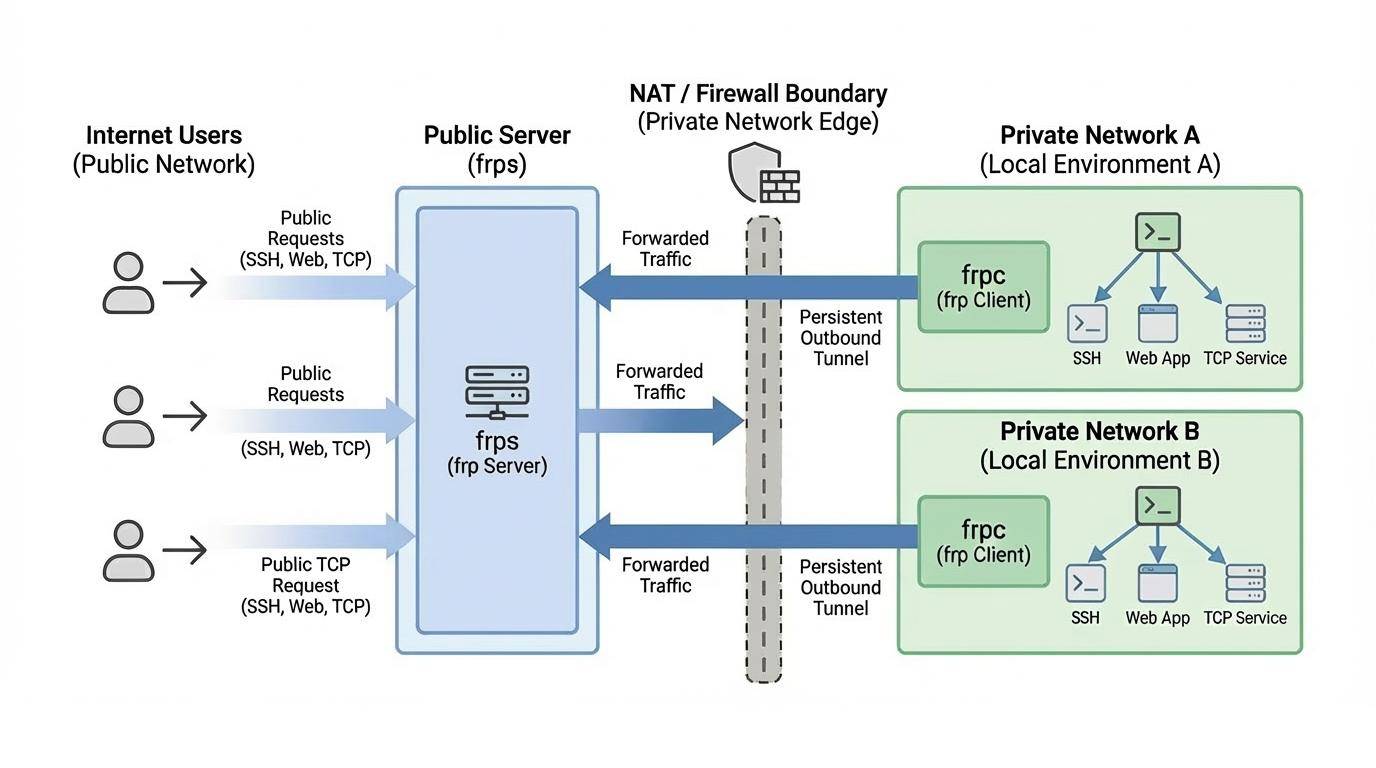
frp is a fast reverse proxy that allows you to expose a local server located behind a NAT or firewall to the Internet. It currently supports TCP and UDP, as well as HTTP and HTTPS protocols, enabling requests to be forwarded to internal services via domain name.
frp is currently under development. You can try the latest release version in the master branch, or use the dev branch to access the version currently in development.
We are currently working on version 2 and attempting to perform some code refactoring and improvements. However, please note that it will not be compatible with version 1.
We will transition from version 0 to version 1 at the appropriate time and will only accept bug fixes and improvements, rather than big feature requests.
About V2
The complexity and difficulty of the v2 version are much higher than anticipated. I can only work on its development during fragmented time periods, and the constant interruptions disrupt productivity significantly. Given this situation, we will continue to optimize and iterate on the current version until we have more free time to proceed with the major version overhaul.
The concept behind v2 is based on my years of experience and reflection in the cloud-native domain, particularly in K8s and ServiceMesh. Its core is a modernized four-layer and seven-layer proxy, similar to envoy. This proxy itself is highly scalable, not only capable of implementing the functionality of intranet penetration but also applicable to various other domains. Building upon this highly scalable core, we aim to implement all the capabilities of frp v1 while also addressing the functionalities that were previously unachievable or difficult to implement in an elegant manner. Furthermore, we will maintain efficient development and iteration capabilities.
In addition, I envision frp itself becoming a highly extensible system and platform, similar to how we can provide a range of extension capabilities based on K8s. In K8s, we can customize development according to enterprise needs, utilizing features such as CRD, controller mode, webhook, CSI, and CNI. In frp v1, we introduced the concept of server plugins, which implemented some basic extensibility. However, it relies on a simple HTTP protocol and requires users to start independent processes and manage them on their own. This approach is far from flexible and convenient, and real-world demands vary greatly. It is unrealistic to expect a non-profit open-source project maintained by a few individuals to meet everyone's needs.
Finally, we acknowledge that the current design of modules such as configuration management, permission verification, certificate management, and API management is not modern enough. While we may carry out some optimizations in the v1 version, ensuring compatibility remains a challenging issue that requires a considerable amount of effort to address.
We sincerely appreciate your support for frp.
Architecture
Example Usage
To begin, download the latest program for your operating system and architecture from the Release page.
Next, place the frps binary and server configuration file on Server A, which has a public IP address.
Finally, place the frpc binary and client configuration file on Server B, which is located on a LAN that cannot be directly accessed from the public internet.
Some antiviruses improperly mark frpc as malware and delete it. This is due to frp being a networking tool capable of creating reverse proxies. Antiviruses sometimes flag reverse proxies due to their ability to bypass firewall port restrictions. If you are using antivirus, then you may need to whitelist/exclude frpc in your antivirus settings to avoid accidental quarantine/deletion. See issue 3637 for more details.
Access your computer in a LAN network via SSH
Modify frps.toml on server A by setting the bindPort for frp clients to connect to:
# frps.tomlbindPort = 7000
Start frps on server A:
./frps -c ./frps.toml
Modify frpc.toml on server B and set the serverAddr field to the public IP address of your frps server:
Note that the localPort (listened on the client) and remotePort (exposed on the server) are used for traffic going in and out of the frp system, while the serverPort is used for communication between frps and frpc.
Start frpc on server B:
./frpc -c ./frpc.toml
To access server B from another machine through server A via SSH (assuming the username is test), use the following command:
This example implements multiple SSH services exposed through the same port using a proxy of type tcpmux. Similarly, as long as the client supports the HTTP Connect proxy connection method, port reuse can be achieved in this way.
Deploy frps on a machine with a public IP and modify the frps.toml file. Here is a simplified configuration:
bindPort = 7000tcpmuxHTTPConnectPort = 5002
Deploy frpc on the internal machine A with the following configuration:
Map the A record of www.example.com to either the public IP of the remote frps server or a CNAME record pointing to your original domain.
Visit your local web service using url http://www.example.com:8080.
Forward DNS query requests
Modify frps.toml:
# frps.tomlbindPort = 7000
Start frps:
./frps -c ./frps.toml
Modify frpc.toml and set serverAddr to the IP address of the remote frps server. Forward DNS query requests to the Google Public DNS server 8.8.8.8:53:
To mitigate risks associated with exposing certain services directly to the public network, STCP (Secret TCP) mode requires a preshared key to be used for access to the service from other clients.
Configure frps same as above.
Start frpc on machine B with the following config. This example is for exposing the SSH service (port 22), and note the secretKey field for the preshared key, and that the remotePort field is removed here:
On machine C, connect to SSH on machine B, using this command:
ssh -oPort=6000 127.0.0.1
P2P Mode
xtcp is designed to transmit large amounts of data directly between clients. A frps server is still needed, as P2P here only refers to the actual data transmission.
Note that it may not work with all types of NAT devices. You might want to fallback to stcp if xtcp doesn't work.
Start frpc on machine B, and expose the SSH port. Note that the remotePort field is removed:
# frpc.tomlserverAddr = "x.x.x.x"serverPort = 7000# set up a new stun server if the default one is not available.# natHoleStunServer = "xxx"[[proxies]]name = "p2p_ssh"type = "xtcp"secretKey = "abcdefg"localIP = "127.0.0.1"localPort = 22
Start another frpc (typically on another machine C) with the configuration to connect to SSH using P2P mode:
# frpc.tomlserverAddr = "x.x.x.x"serverPort = 7000# set up a new stun server if the default one is not available.# natHoleStunServer = "xxx"[[visitors]]name = "p2p_ssh_visitor"type = "xtcp"serverName = "p2p_ssh"secretKey = "abcdefg"bindAddr = "127.0.0.1"bindPort = 6000# when automatic tunnel persistence is required, set it to truekeepTunnelOpen = false
On machine C, connect to SSH on machine B, using this command:
ssh -oPort=6000 127.0.0.1
Features
Configuration Files
Since v0.52.0, we support TOML, YAML, and JSON for configuration. Please note that INI is deprecated and will be removed in future releases. New features will only be available in TOML, YAML, or JSON. Users wanting these new features should switch their configuration format accordingly.
Read the full example configuration files to find out even more features not described here.
Examples use TOML format, but you can still use YAML or JSON.
These configuration files is for reference only. Please do not use this configuration directly to run the program as it may have various issues.
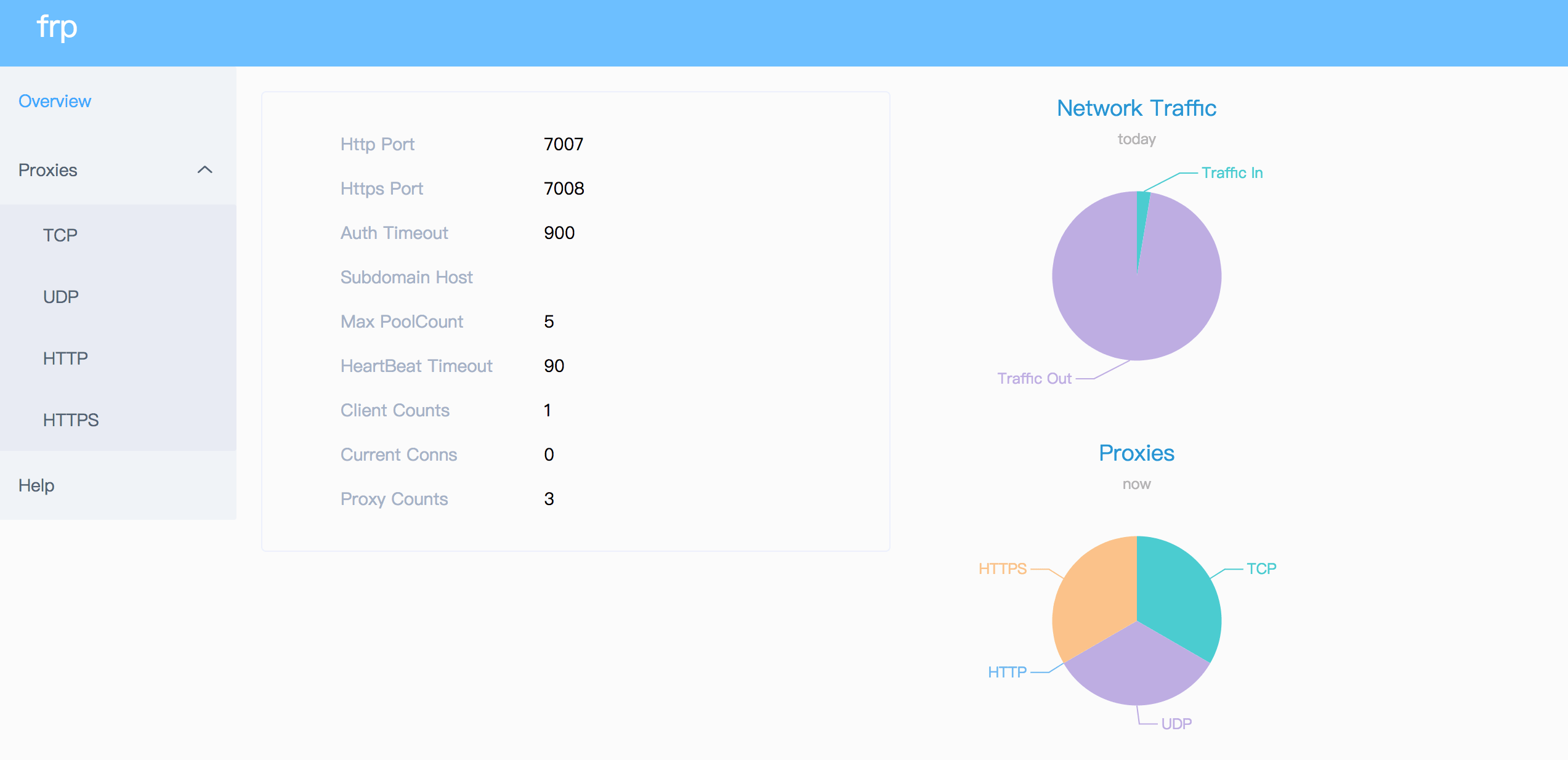
Check frp's status and proxies' statistics information by Dashboard.
Configure a port for dashboard to enable this feature:
# The default value is 127.0.0.1. Change it to 0.0.0.0 when you want to access it from a public network.webServer.addr = "0.0.0.0"webServer.port = 7500# dashboard's username and password are both optionalwebServer.user = "admin"webServer.password = "admin"
Then visit http://[serverAddr]:7500 to see the dashboard, with username and password both being admin.
Additionally, you can use HTTPS port by using your domains wildcard or normal SSL certificate:
webServer.port = 7500# dashboard's username and password are both optionalwebServer.user = "admin"webServer.password = "admin"webServer.tls.certFile = "server.crt"webServer.tls.keyFile = "server.key"
Then visit https://[serverAddr]:7500 to see the dashboard in secure HTTPS connection, with username and password both being admin.
Client Admin UI
The Client Admin UI helps you check and manage frpc's configuration and proxies.
Configure an address for admin UI to enable this feature:
Then visit http://127.0.0.1:7400 to see admin UI, with username and password both being admin.
Dynamic Proxy Management (Store)
You can dynamically create, update, and delete proxies and visitors at runtime through the Web UI or API, without restarting frpc.
To enable this feature, configure store.path to specify a file for persisting the configurations:
[store]path = "./db.json"
Proxies and visitors managed through the Store are saved to disk and automatically restored on frpc restart. They work alongside proxies defined in the configuration file — Store entries take precedence when names conflict.
Monitor
When web server is enabled, frps will save monitor data in cache for 7 days. It will be cleared after process restart.
Prometheus is also supported.
Prometheus
Enable dashboard first, then configure enablePrometheus = true in frps.toml.
http://{dashboard_addr}/metrics will provide prometheus monitor data.
Authenticating the Client
There are 2 authentication methods to authenticate frpc with frps.
You can decide which one to use by configuring auth.method in frpc.toml and frps.toml, the default one is token.
Configuring auth.additionalScopes = ["HeartBeats"] will use the configured authentication method to add and validate authentication on every heartbeat between frpc and frps.
Configuring auth.additionalScopes = ["NewWorkConns"] will do the same for every new work connection between frpc and frps.
Token Authentication
When specifying auth.method = "token" in frpc.toml and frps.toml - token based authentication will be used.
Make sure to specify the same auth.token in frps.toml and frpc.toml for frpc to pass frps validation
Token Source
frp supports reading authentication tokens from external sources using the tokenSource configuration. Currently, file-based token source is supported.
The token will be read from the specified file at startup. This is useful for scenarios where tokens are managed by external systems or need to be kept separate from configuration files for security reasons.
OIDC Authentication
When specifying auth.method = "oidc" in frpc.toml and frps.toml - OIDC based authentication will be used.
Since v0.50.0, the default value of transport.tls.enable and transport.tls.disableCustomTLSFirstByte has been changed to true, and tls is enabled by default.
For port multiplexing, frp sends a first byte 0x17 to dial a TLS connection. This only takes effect when you set transport.tls.disableCustomTLSFirstByte to false.
To enforcefrps to only accept TLS connections - configure transport.tls.force = true in frps.toml. This is optional.
You will need a root CA cert and at least one SSL/TLS certificate. It can be self-signed or regular (such as Let's Encrypt or another SSL/TLS certificate provider).
If you using frp via IP address and not hostname, make sure to set the appropriate IP address in the Subject Alternative Name (SAN) area when generating SSL/TLS Certificates.
Given an example:
Prepare openssl config file. It exists at /etc/pki/tls/openssl.cnf in Linux System and /System/Library/OpenSSL/openssl.cnf in MacOS, and you can copy it to current path, like cp /etc/pki/tls/openssl.cnf ./my-openssl.cnf. If not, you can build it by yourself, like:
Then run command frpc reload -c ./frpc.toml and wait for about 10 seconds to let frpc create or update or remove proxies.
Note that global client parameters won't be modified except 'start'.
start is a global allowlist evaluated after all sources are merged (config file/include/store).
If start is non-empty, any proxy or visitor not listed there will not be started, including
entries created via Store API.
start is kept mainly for compatibility and is generally not recommended for new configurations.
Prefer per-proxy/per-visitor enabled, and keep start empty unless you explicitly want this
global allowlist behavior.
You can run command frpc verify -c ./frpc.toml before reloading to check if there are config errors.
Get proxy status from client
Use frpc status -c ./frpc.toml to get status of all proxies. The webServer fields are required for enabling HTTP API.
Only allowing certain ports on the server
allowPorts in frps.toml is used to avoid abuse of ports:
# frps.tomlallowPorts = [
{ start = 2000, end = 3000 },
{ single = 3001 },
{ single = 3003 },
{ start = 4000, end = 50000 }
]
Port Reuse
vhostHTTPPort and vhostHTTPSPort in frps can use same port with bindPort. frps will detect the connection's protocol and handle it correspondingly.
What you need to pay attention to is that if you want to configure vhostHTTPSPort and bindPort to the same port, you need to first set transport.tls.disableCustomTLSFirstByte to false.
We would like to try to allow multiple proxies bind a same remote port with different protocols in the future.
Set transport.bandwidthLimit in each proxy's configure to enable this feature. Supported units are MB and KB.
Set transport.bandwidthLimitMode to client or server to limit bandwidth on the client or server side. Default is client.
TCP Stream Multiplexing
frp supports tcp stream multiplexing since v0.10.0 like HTTP2 Multiplexing, in which case all logic connections to the same frpc are multiplexed into the same TCP connection.
You can disable this feature by modify frps.toml and frpc.toml:
# frps.toml and frpc.toml, must be sametransport.tcpMux = false
Support KCP Protocol
KCP is a fast and reliable protocol that can achieve the transmission effect of a reduction of the average latency by 30% to 40% and reduction of the maximum delay by a factor of three, at the cost of 10% to 20% more bandwidth wasted than TCP.
KCP mode uses UDP as the underlying transport. Using KCP in frp:
Enable KCP in frps:
# frps.tomlbindPort = 7000# Specify a UDP port for KCP.kcpBindPort = 7000
The kcpBindPort number can be the same number as bindPort, since bindPort field specifies a TCP port.
Configure frpc.toml to use KCP to connect to frps:
# frpc.tomlserverAddr = "x.x.x.x"# Same as the 'kcpBindPort' in frps.tomlserverPort = 7000transport.protocol = "kcp"
Support QUIC Protocol
QUIC is a new multiplexed transport built on top of UDP.
Using QUIC in frp:
Enable QUIC in frps:
# frps.tomlbindPort = 7000# Specify a UDP port for QUIC.quicBindPort = 7000
The quicBindPort number can be the same number as bindPort, since bindPort field specifies a TCP port.
Configure frpc.toml to use QUIC to connect to frps:
# frpc.tomlserverAddr = "x.x.x.x"# Same as the 'quicBindPort' in frps.tomlserverPort = 7000transport.protocol = "quic"
Connection Pooling
By default, frps creates a new frpc connection to the backend service upon a user request. With connection pooling, frps keeps a certain number of pre-established connections, reducing the time needed to establish a connection.
This feature is suitable for a large number of short connections.
Configure the limit of pool count each proxy can use in frps.toml:
# frps.tomltransport.maxPoolCount = 5
Enable and specify the number of connection pool:
# frpc.tomltransport.poolCount = 1
Load balancing
Load balancing is supported by group.
This feature is only available for types tcp, http, tcpmux now.
Connections to port 80 will be dispatched to proxies in the same group randomly.
For type tcp, remotePort in the same group should be the same.
For type http, customDomains, subdomain, locations should be the same.
Service Health Check
Health check feature can help you achieve high availability with load balancing.
Add healthCheck.type = "tcp" or healthCheck.type = "http" to enable health check.
With health check type tcp, the service port will be pinged (TCPing):
# frpc.toml[[proxies]]name = "test1"type = "tcp"localPort = 22remotePort = 6000# Enable TCP health checkhealthCheck.type = "tcp"# TCPing timeout secondshealthCheck.timeoutSeconds = 3# If health check failed 3 times in a row, the proxy will be removed from frpshealthCheck.maxFailed = 3# A health check every 10 secondshealthCheck.intervalSeconds = 10
With health check type http, an HTTP request will be sent to the service and an HTTP 2xx OK response is expected:
# frpc.toml[[proxies]]name = "web"type = "http"localIP = "127.0.0.1"localPort = 80customDomains = ["test.example.com"]
# Enable HTTP health checkhealthCheck.type = "http"# frpc will send a GET request to '/status'# and expect an HTTP 2xx OK responsehealthCheck.path = "/status"healthCheck.timeoutSeconds = 3healthCheck.maxFailed = 3healthCheck.intervalSeconds = 10
Rewriting the HTTP Host Header
By default frp does not modify the tunneled HTTP requests at all as it's a byte-for-byte copy.
However, speaking of web servers and HTTP requests, your web server might rely on the Host HTTP header to determine the website to be accessed. frp can rewrite the Host header when forwarding the HTTP requests, with the hostHeaderRewrite field:
The HTTP request will have the Host header rewritten to Host: dev.example.com when it reaches the actual web server, although the request from the browser probably has Host: test.example.com.
Setting other HTTP Headers
Similar to Host, You can override other HTTP request and response headers with proxy type http.
In this example, it will set header x-from-where: frp in the HTTP request and foo: bar in the HTTP response.
Get Real IP
HTTP X-Forwarded-For
This feature is for http proxies or proxies with the https2http and https2https plugins enabled.
You can get user's real IP from HTTP request headers X-Forwarded-For.
Proxy Protocol
frp supports Proxy Protocol to send user's real IP to local services.
Here is an example for https service:
# frpc.toml[[proxies]]name = "web"type = "https"localPort = 443customDomains = ["test.example.com"]
# now v1 and v2 are supportedtransport.proxyProtocolVersion = "v2"
You can enable Proxy Protocol support in nginx to expose user's real IP in HTTP header X-Real-IP, and then read X-Real-IP header in your web service for the real IP.
Require HTTP Basic Auth (Password) for Web Services
Anyone who can guess your tunnel URL can access your local web server unless you protect it with a password.
This enforces HTTP Basic Auth on all requests with the username and password specified in frpc's configure file.
Now you can visit your web service on test.frps.com.
Note that if subdomainHost is not empty, customDomains should not be the subdomain of subdomainHost.
URL Routing
frp supports forwarding HTTP requests to different backend web services by url routing.
locations specifies the prefix of URL used for routing. frps first searches for the most specific prefix location given by literal strings regardless of the listed order.
HTTP requests with URL prefix /news or /about will be forwarded to web02 and other requests to web01.
TCP Port Multiplexing
frp supports receiving TCP sockets directed to different proxies on a single port on frps, similar to vhostHTTPPort and vhostHTTPSPort.
The only supported TCP port multiplexing method available at the moment is httpconnect - HTTP CONNECT tunnel.
When setting tcpmuxHTTPConnectPort to anything other than 0 in frps, frps will listen on this port for HTTP CONNECT requests.
The host of the HTTP CONNECT request will be used to match the proxy in frps. Proxy hosts can be configured in frpc by configuring customDomains and / or subdomain under tcpmux proxies, when multiplexer = "httpconnect".
We can use the range syntax of Go template combined with the built-in parseNumberRangePair function to achieve port range mapping.
The following example, when run, will create 8 proxies named test-6000, test-6001 ... test-6007, each mapping the remote port to the local port.
{{- range $_, $v := parseNumberRangePair "6000-6006,6007" "6000-6006,6007" }}
[[proxies]]
name = "tcp-{{ $v.First }}"
type = "tcp"
localPort = {{ $v.First }}
remotePort = {{ $v.Second }}
{{- end }}
Client Plugins
frpc only forwards requests to local TCP or UDP ports by default.
Plugins are used for providing rich features. There are built-in plugins such as unix_domain_socket, http_proxy, socks5, static_file, http2https, https2http, https2https and you can see example usage.
frp supports listening to an SSH port on the frps side and achieves TCP protocol proxying through the SSH -R protocol, without relying on frpc.
# frps.tomlsshTunnelGateway.bindPort = 2200
When running ./frps -c frps.toml, a private key file named .autogen_ssh_key will be automatically created in the current working directory. This generated private key file will be used by the SSH server in frps.
Please refer to this document for more information.
Virtual Network (VirtualNet)
Alpha feature added in v0.62.0
The VirtualNet feature enables frp to create and manage virtual network connections between clients and visitors through a TUN interface. This allows for IP-level routing between machines, extending frp beyond simple port forwarding to support full network connectivity.
For detailed information about configuration and usage, please refer to the VirtualNet documentation.
Feature Gates
frp supports feature gates to enable or disable experimental features. This allows users to try out new features before they're considered stable.
Available Feature Gates
Name
Stage
Default
Description
VirtualNet
ALPHA
false
Virtual network capabilities for frp
Enabling Feature Gates
To enable an experimental feature, add the feature gate to your configuration:
featureGates = { VirtualNet = true }
Feature Lifecycle
Features typically go through three stages:
ALPHA: Disabled by default, may be unstable
BETA: May be enabled by default, more stable but still evolving
GA (Generally Available): Enabled by default, ready for production use
Related Projects
gofrp/plugin - A repository for frp plugins that contains a variety of plugins implemented based on the frp extension mechanism, meeting the customization needs of different scenarios.
gofrp/tiny-frpc - A lightweight version of the frp client (around 3.5MB at minimum) implemented using the ssh protocol, supporting some of the most commonly used features, suitable for devices with limited resources.
Contributing
Interested in getting involved? We would like to help you!
Take a look at our issues list and consider sending a Pull Request to dev branch.
If you want to add a new feature, please create an issue first to describe the new feature, as well as the implementation approach. Once a proposal is accepted, create an implementation of the new features and submit it as a pull request.
Sorry for my poor English. Improvements for this document are welcome, even some typo fixes.