An agent skill that turns an architecture discussion into an explorable isometric atlas: one data file, an interactive map and a generated SYSTEM.md
HTML317133 issuesMIT License
创建于 2026-08-20最近推送 2026-08-20
项目说明
System Atlas
An agent skill that turns an architecture discussion into something you can click around.
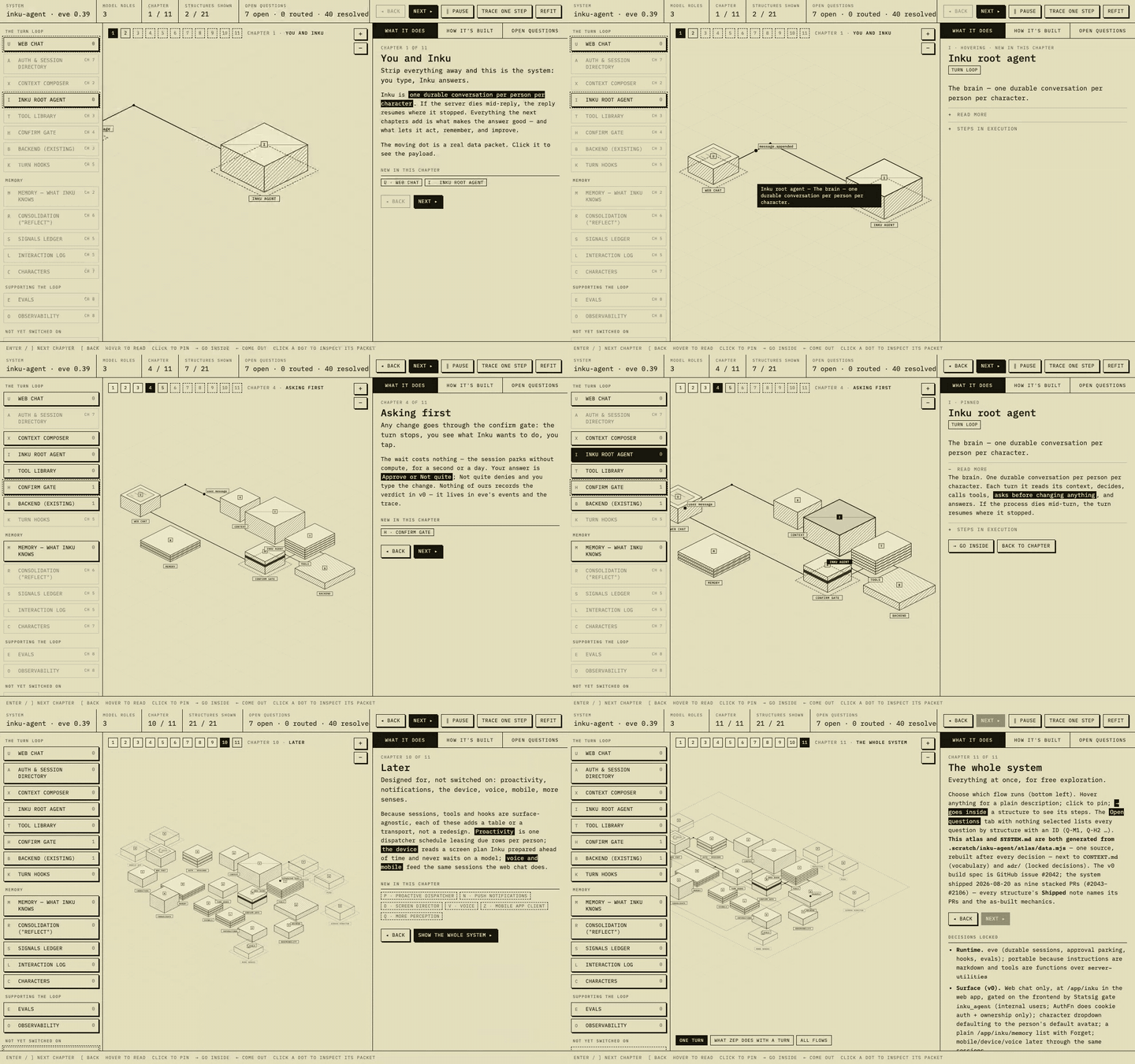
Above: a real atlas of a production agent system, built with this skill — chapters reveal the system a few structures at a time, hovering reads a structure, and going inside one shows its steps in execution.
npx skills add inkboard/system-atlas
Why
Architecture discussions produce decisions, questions, and vocabulary faster than any one document can hold, and the person you are discussing with wants to see the system, not read it. So you draw a diagram, and a week later the diagram is a lie. An atlas fixes the shape of that problem rather than the diagram: one data file in the repo is the single source, and it renders two views that always agree — an interactive isometric map you explore with a mouse, and a generated text twin (SYSTEM.md) that carries the decisions table, every structure, the flows, and every open question by stable ID. The map is what you put in front of a person; the text is what the repo and your next session read; because both are generated from the same file, updating the design is one edit and a rebuild, and there is exactly one place where the system can be wrong.
What you get
An interactive isometric map — hover a structure to read it, click to pin it, arrow-right to go inside and see its steps in execution, pan and zoom the whole thing. One self-contained HTML file, no build step, no runtime dependencies.
inkboard/system-atlas|GitHub 仓库详情 | 极客日志
Progressive-disclosure chapters — a whole system at once reads as noise. Each chapter reveals at most three new structures and runs one small data flow that only touches what you have already seen; the last chapter shows everything with a flow picker.
Moving data packets you can inspect — the dots travelling the hops are real requests. Click one and the panel shows its route and a representative JSON payload, so "how does a turn actually work" has a visual answer.
A generated text twin — SYSTEM.md, rebuilt from the same data: the decisions table with ADR links, every structure's what/how/steps, the flow tables, and the question index.
Question tracking by ID — every open question gets a stable Q-<code><n> and a state: open, resolved (with the answer and the date), or routed to a named next step. You can run several rounds of feedback against it without losing track of what was asked or who answered it.
Role shapes and readable labels — the brain, the stores, the tool decks, the gates and the scheduled jobs each get their own isometric form and a name tag on the canvas, so the map is legible without a key.
The process, not just the renderer — the skill carries the design language and the session lessons that produced it, so the agent knows the order to work in and the corrections to skip.
Using it
Ask for one in plain language. The skill triggers on things like:
"make me an atlas of this pipeline"
"map the system so we can talk about it"
"I want a diagram I can click around and poke holes in"
"walk me through how this fits together"
"update the atlas — we dropped the nightly job and picked a different vendor"
Then the agent works in this order:
Read the inputs before drawing — the vision doc, the repo's real surfaces, the framework's docs. Boxes that don't map to something real are worse than no boxes.
Discuss before drawing — propose the structure in chat, mapped to the runtime's actual primitives, and ask only the questions it cannot derive from the repo.
Build the first atlas, then cut it into chapters — the first version is always "hard to parse"; progressive disclosure is the fix, and it is the default here.
Generate the text twin and keep the glossary (CONTEXT.md) and ADRs beside it.
Run feedback rounds by question ID — record the person's actual words, resolve with a date, and sweep every file after a rejection. A banner on a stale section is not enough.
Rebuild and republish after every change. An atlas that is out of date is worse than no atlas.
How it works
<atlas home>/data.mjs          ← the only file you edit
<atlas home>/build.mjs         ← bun build.mjs
<atlas home>/template.html     ← the renderer
        ↓
   atlas.html   +   SYSTEM.md  ← both generated, never hand-edited
data.mjs holds the structures (position, footprint, role shape, prose, steps, questions), the flows as hop lists with payloads, the chapters with what each reveals, and the decisions. build.mjs writes both views from it. assets/data.example.mjs is a working starter with every field documented — copy it, fill it in, run the build, and you have an atlas.
Where the atlas lives depends on your repo's docs policy. Repos that commit design docs can keep it at docs/<system>/atlas/; repos that deliberately commit only ADRs and a glossary should keep it in a git-ignored scratch directory and attach the generated SYSTEM.md to the spec issue instead. The skill asks before committing anything.
The map is a single self-contained HTML file, so publishing it is whatever the person can open: a hosted HTML artifact if your agent can publish one, a static server (npx serve, python3 -m http.server), or your repo's pages host. The rule is one URL, republished in place.
What's in the repo
Path
What it is
skills/system-atlas/SKILL.md
The skill: when to use it, the process, what done looks like
skills/system-atlas/assets/template.html
The atlas renderer
skills/system-atlas/assets/build.mjs
data.mjs → atlas.html + SYSTEM.md
skills/system-atlas/assets/data.example.mjs
Documented starter data — copy to data.mjs
skills/system-atlas/references/design-language.md
Layout, palette, isometric grammar, role shapes, copy rules, the chapter recipe
How the first session went, the subagent deep-dive pattern, and the things that bit
skills/system-atlas/evals/evals.json
Three eval prompts: a new atlas, an update, and a small greenfield one
Installing
The skills CLI installs into Claude Code, Cursor, Copilot, Codex, Gemini, Cline, Amp and others:
npx skills add inkboard/system-atlas
Or drop skills/system-atlas/ into your agent's skills directory by hand — for Claude Code that is ~/.claude/skills/system-atlas/ (personal) or .claude/skills/system-atlas/ (per project).
Credits
The visual grammar takes after the "codebase as interactive isometric diagram" style — khaki paper, black hatched structures, an index on the left, a reading panel on the right, and data packets you can catch. The process rules are the corrections from a real design session, kept in the order they were earned.