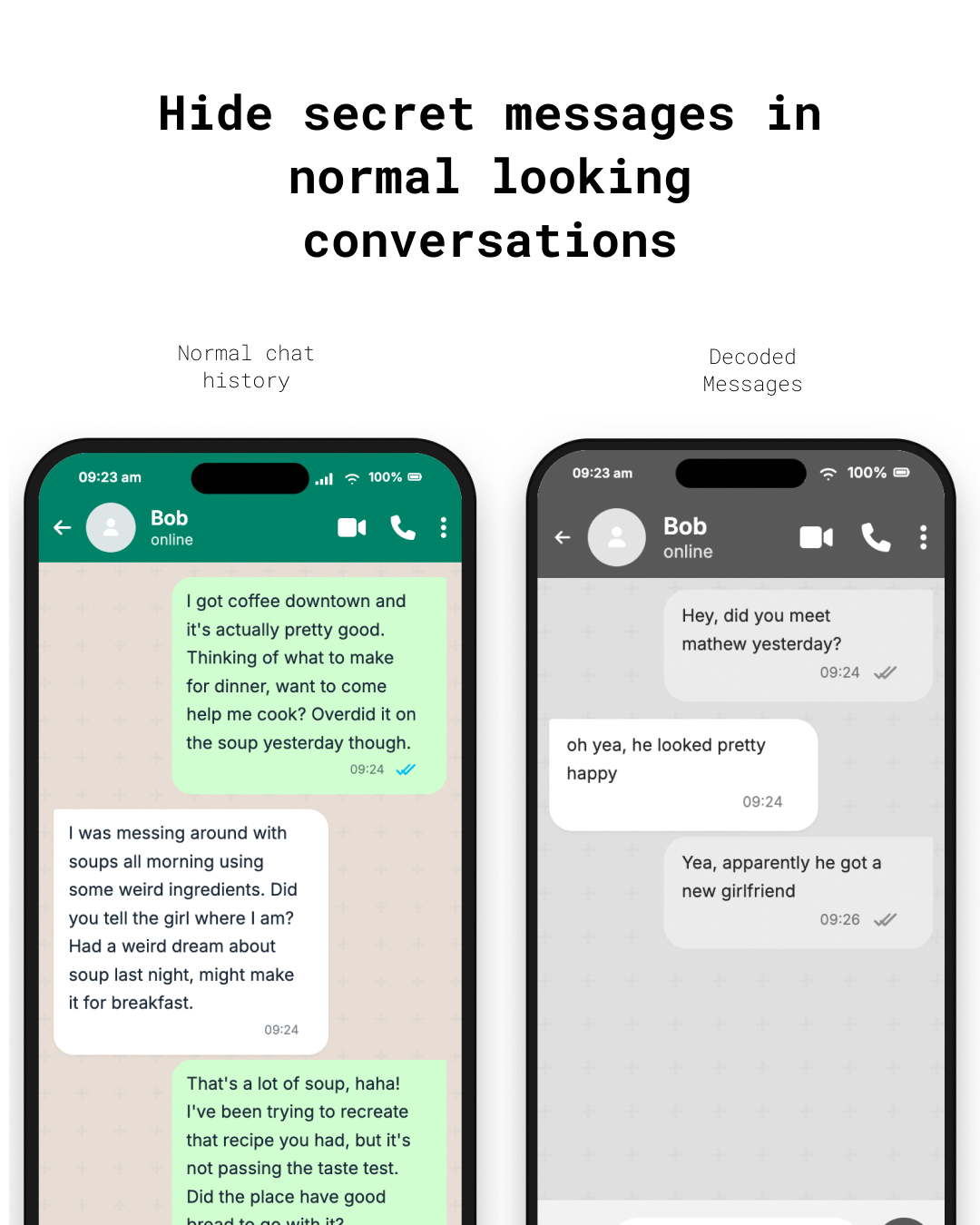
Conversation Stenography lets two people have a completely private conversation through any messaging app (WhatsApp, Telegram, Signal, iMessage, email, or even Instagram DMs). Your secret messages are encrypted and then disguised as innocent, natural-sounding text generated by a local AI model. No one reading the chat can tell there's a hidden message.
Why Conversation Stenography?
Governments are moving toward scanning private messages
Sending normal encrypted messages is risky because it might flag you on basis of suspicioun
personal note: I'm 18, and I'm definitely not the first person to explore this idea. LLM-based steganography has existed for years, even GPT-2, the local model used by this project, was released in 2019. People far capable than me have likely been experimenting with techniques like this for a long time. This project simply demonstrates a practical use case for LLMs that may already be operating at scale.
[!CAUTION]
Educational Use Only
This project is provided for educational and research purposes. Engaging in any unauthorized or illegal activities is strictly prohibited. The creator assumes no liability for any misuse.
[!WARNING]
This is a proof of concept and still has multiple issues. There are several techniques being already developed to figure out if a text has hidden content.
Example: You type "meet me at the coffee shop at 3pm" and Conversation Stenography generates something like "Hey, I was just thinking about that recipe you mentioned. It sounds amazing, especially the part about the fresh basil." which is what gets sent in your chat app. Your friend's Conversation Stenography decodes it back to .
"meet me at the coffee shop at 3pm"
Your actual messages never leave your device unencrypted. The messaging platform only ever sees innocent cover text.
Quick Start
1. Install
# Clone and build
git clone https://github.com/nethical/conversation-stenography.git
cd conversation-stenography
go build -o conversation-stenography ./cmd/conversation-stenography
2. First run — setup wizard
./conversation-stenography
On first run, Conversation Stenography walks you through everything:
Lets you pick an AI model (with recommendations for your system)
Downloads the model automatically
Creates your config file
That's it. You're ready to chat.
Test with two users on one device
You do not need two computers or phones to verify that Conversation Stenography works. After
setup, start a local two-person simulation:
./conversation-stenography simulate
Enter your shared secret phrase when prompted. The terminal starts as Alice:
Alice> Meet me outside at six.
  Generating and transporting cover text...

  Cover text (what the messaging app would see):
  <innocent-looking generated message>

  Bob decoded: Meet me outside at six.

Bob> That works for me.
Each turn uses two independent protocol participants. One generates the cover
text and the other decodes it, then the prompt automatically switches users.
This exercises the same encryption, model encoding, decoding, and conversation
chain used between separate devices.
Simulation commands:
Command
What it does
/switch
Switch the active user without sending
/show
Show the simulated plaintext conversation
/help
Show simulation help
/quit
Exit; simulation state is not saved
Names and the test conversation can be customized:
./conversation-stenography simulate -user-a Alex -user-b Samir -conversation test-chat
3. Start chatting
./conversation-stenography
The tool prompts you for a conversation name and your name, then drops you into the chat:
  ┌─────────────────────────────────────┐
  │        🔒  Secure Chat Active       │
  └─────────────────────────────────────┘

  Conversation:  coffee-plans
  You are:       alex

  HOW TO USE:
  • Type a message and press Enter → generates cover text to copy
  • /paste SENDER → paste a message you received from someone
  • /help → see all commands
  • /quit → save and exit

alex>
4. Send a message
Just type your secret message:
alex> Hey, can we meet tomorrow at noon?
  ⏳ Generating cover text...

  ┌─── COPY THIS into your messaging app ───┐

  I was thinking about trying that new place downtown.
  Have you been there before? I heard they have great pasta.

  └─── END — send as alex ───────────────────┘
Copy the cover text and paste it into WhatsApp/Telegram/Signal.
5. Receive a message
When your friend sends you a response through the messaging app:
alex> /paste bob
  Paste the exact message received from bob below.
  Then type /end on a new line when done:

Yeah the pasta place sounds great! My friend went last week
and said the carbonara was incredible.
/end

  📩 Message from bob:
  Sure, noon works! See you there.
How It Works (for the curious)
Your secret message
        ↓
   [AES encryption]
        ↓
   [AI model generates innocent text
    that encodes the encrypted bytes
    in its token choices]
        ↓
Normal-looking chat text  →  WhatsApp/Telegram/Signal  →  Friend's Conversation Stenography
        ↓                                                       ↓
   [AI model recovers                                   [Same process
    the encrypted bytes                                  in reverse]
    from token choices]                                        ↓
        ↓                                              Your secret message
   [AES decryption]
        ↓
  Original message
Conversation chain — every message is cryptographically linked to the previous one; tampering, deletion, or reordering is detected
Local AI model — the model runs entirely on your device, nothing is sent to the cloud
Shared secret phrase — derived using PBKDF2 with 600,000 rounds; never stored on disk
Setup for Two People
Both people need the exact same configuration:
Meet in person and agree on:
A secret phrase (6+ random words, e.g. "purple elephant dances under crimson moonlight")
A conversation name (e.g. "coffee-plans")
The same model (e.g. both pick option 1 in the setup wizard)
Each person runs:
./conversation-stenography
# Enter the same conversation name# Enter your own name# Enter the shared secret phrase when prompted
Exchange messages through any messaging app — just copy/paste the cover text.
[!IMPORTANT]
Both people must process messages in the exact same order they appear in the messaging app. If you miss a message, use /paste to process it before sending your next reply.
Commands
Command
What it does
./conversation-stenography
Start chatting (or first-run setup)
./conversation-stenography setup
Re-run the setup wizard
./conversation-stenography simulate
Test two independent users on one device
./conversation-stenography conversations
List your saved conversations
./conversation-stenography chat -conversation NAME -me NAME
Start with explicit flags
In-chat commands
Command
What it does
(just type)
Send an encrypted message
/paste NAME
Decode a received message from NAME
/send
Multi-line message (end with /end)
/show
Show conversation history
/status
Show sync info (useful for debugging)
/help
List all commands
/quit
Save and exit
Supported Models
The setup wizard offers these models:
Model
Size
Runtime
Best for
Llama 3.2 3B (4-bit)
~2 GB
MLX
Apple Silicon Macs (recommended)
Llama 3.2 1B (4-bit)
~1 GB
MLX
Apple Silicon (lightweight)
Llama 3.1 8B (4-bit)
~5 GB
MLX
Apple Silicon (best quality)
GPT-2
~500 MB
Transformers
Any system
GPT-2 Medium
~1.5 GB
Transformers
Any system (better quality)
Prerequisites
Go 1.22+ (to build)
Python 3.9+
The setup wizard creates an isolated virtual environment when necessary and
installs mlx-lm (Apple Silicon) or torch + transformers (other systems),
plus huggingface-hub. You do not need to install the hf command separately.
Path to config file (default: conversation-stenography.local.json)
CONVERSATION_STENOGRAPHY_MODEL
Override model path
CONVERSATION_STENOGRAPHY_PYTHON
Override Python path
CONVERSATION_STENOGRAPHY_RUNTIME
Override runtime (mlx or transformers)
Runtime configuration is machine-specific and is intentionally not committed.
Run conversation-stenography setup to generate
conversation-stenography.local.json, or copy
conversation-stenography.example.json and adjust it for your environment.
Never commit local model paths, interpreter paths, or credentials.
Existing installations can continue using decalgo.local.json,
~/.decalgo/conversations, and DECALGO_* variables while migrating. New
files and documentation use the Conversation Stenography names.
Advanced: Scripted Usage
For shell automation (e.g. bots, CI, automated relays):
export CONVERSATION_STENOGRAPHY_SECRET='purple elephant dances under crimson moonlight'
./conversation-stenography chat -conversation coffee-plans -me alex
Messages must be copied exactly. No autocorrect, no formatting, no smart quotes. Copy and paste the cover text byte-for-byte.
Process messages in order. Both people must paste received messages in the exact order they appear in the messaging app.
Same model required. Both people must use the same AI model, same version, same settings. The setup wizard handles this.
The secret phrase is never stored. You'll need to re-enter it each time you start Conversation Stenography (or set CONVERSATION_STENOGRAPHY_SECRET).
Security Model
Messages are encrypted with AES-SIV (Synthetic Initialization Vector), which provides both confidentiality and integrity.
Every message is chained — each carrier authenticates the sender, conversation ID, message index, and the hash of all previous messages.
The shared phrase is stretched with PBKDF2-HMAC-SHA-256 (600,000 iterations).
The AI model runs 100% locally. No API calls, no cloud, no telemetry.
Conversation state is encrypted at rest with AES-GCM.
Building from source
git clone https://github.com/nethical6/conversation-stenography.git
cd conversation-stenography
go build -o conversation-stenography ./cmd/conversation-stenography
go test ./...