Codex plugin that turns attached object images into code-only, animation-ready procedural Three.js models.
Python456520 issuesMIT License
创建于 2026-07-09最近推送 2026-07-11
项目说明
Three.js Object Sculptor
Turn the object in an attached image into a quality-gated, animation-ready procedural Three.js model built entirely with code.
Three.js Object Sculptor is a Codex plugin for rebuilding the visible object in a user-provided attachment image as a code-only Three.js model. It does not try to do photogrammetry, download an art pack, or extract a perfect mesh from one image. Instead, it guides Codex through a sculpting workflow: validate the image, describe the object precisely, decompose it into geometry and material systems, build from blockout to detail, wire an animation-friendly hierarchy, then compare the browser render against the original reference.
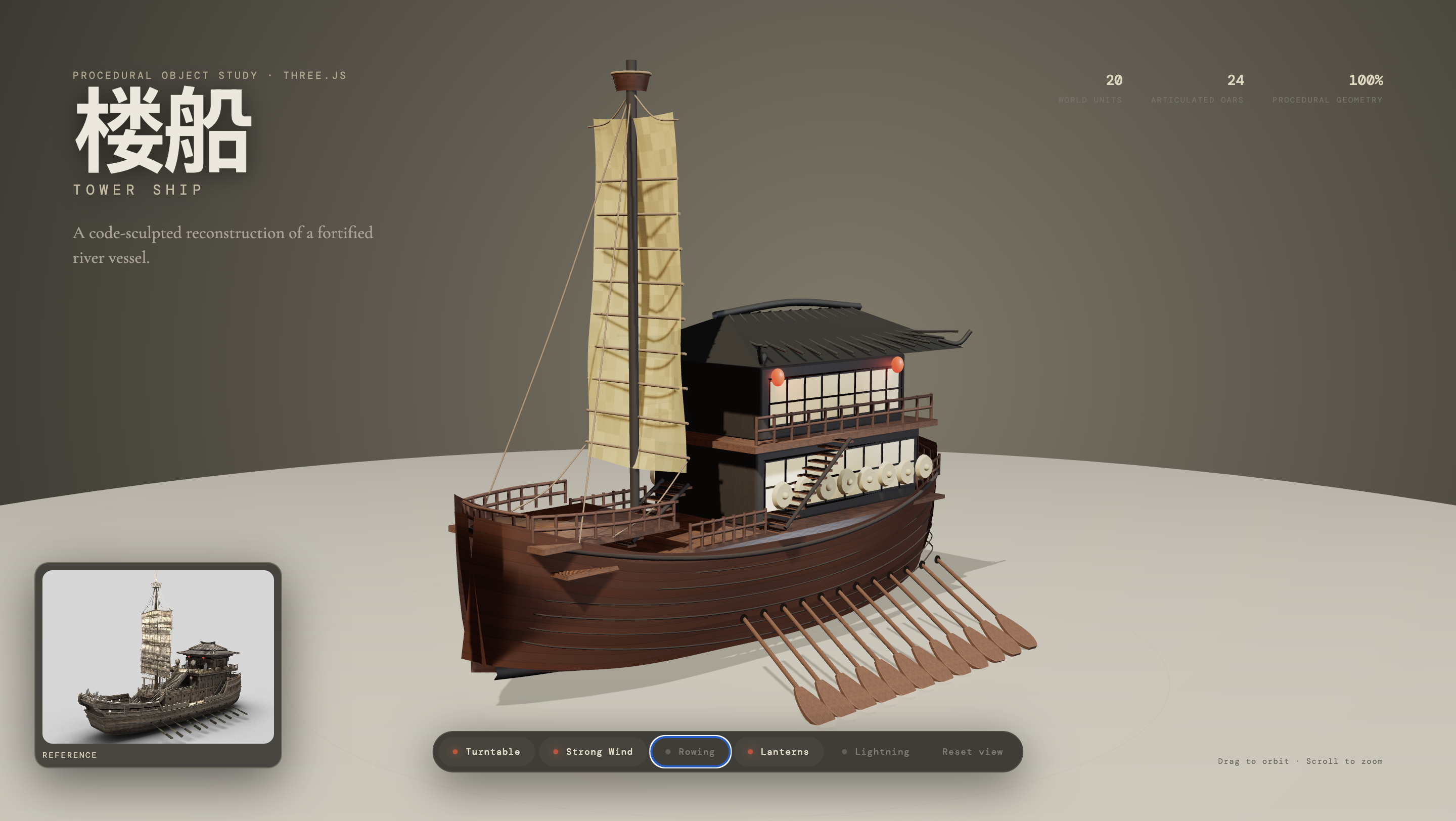
This tower ship study shows the intended output shape: a browser-rendered, code-sculpted Three.js object rebuilt from an attached reference image, with procedural geometry, articulated parts, material work, and interactive controls.
This botanical study reconstructs a complex ancient tree with procedural curves, deterministic branching, layered bark materials, dense autumn foliage, and an animation-ready hierarchy.
At A Glance
Name: Three.js Object Sculptor
Category: Codex plugin for image-to-procedural-3D workflows
Input: an attached object image, reference screenshot, or local image path
Output: a code-only procedural Three.js object factory, backed by an ObjectSculptSpec
Primary goal: recreate the target object's silhouette, component structure, materials, lighting response, and action-ready hierarchy in browser-friendly Three.js code
Best for: animation-ready real-time props, game objects, scene dressing, destructible objects, product-style objects, botanical objects, mechanical parts, and stylized reference reconstructions
Not for: photogrammetry, exact mesh extraction, scanned assets, downloaded art packs, or guaranteed production-perfect geometry from one image
What It Does
Validates whether an image is suitable for procedural 3D reconstruction.
Creates a pre-spec complexity assessment before code generation.
Writes an ObjectSculptSpec with component hierarchy, materials, lighting, pivots, sockets, animation anchors, destruction anchors, and quality targets.
Enforces a staged build pipeline: blockout, structural pass, form refinement, material pass, surface pass, lighting pass, interaction pass, and optimization.
Generates a code-only Three.js factory skeleton from the current unlocked sculpt pass.
Designs the generated object as an action-ready hierarchy, so later animation, transformation, physics, or destruction requests have real pivots and attachment points to use.
Packages reference/render screenshots into one comparison sheet for AI vision review.
Records self-correction reviews with overall, layer, and critical feature scores.
Supports reference-derived procedural PBR evidence: albedo, roughness estimate, height, normal, and AO maps.
Use Cases
Convert an attached object image into a procedural Three.js model generated entirely with TypeScript and geometry code.
Build animation-ready Three.js props with meaningful pivots, sockets, parent-child hierarchy, and transform anchors.
Recreate reference objects as browser-friendly procedural assets without relying on downloaded meshes or external art packs.
Generate a structured object spec before implementation, so Codex understands geometry, materials, lighting, local surface features, and interaction readiness.
Create destructible or transformable objects by planning detachable parts, fracture seams, colliders, and effect emitters before the model is coded.
Compare the rendered model against the original attachment with AI vision and block progress when critical features do not match.
Produce reusable procedural object factories for Three.js games, WebGPU demos, interactive prototypes, and visual experiments.
Why This Exists
Procedural 3D generation can fail in a very specific way: the silhouette is "kind of right", but the object loses the details that make it recognizable. This plugin is designed to slow Codex down at the right moments:
First understand what object class and complexity tier it is dealing with.
Define what "good enough" means for this specific object.
Build from coarse structure to fine surface response.
Fail a pass if an identity-defining feature is wrong, even when the overall score looks acceptable.
The result is less "one-shot generated mesh" and more "Codex as a procedural sculptor with checkpoints": block out the form, attach the moving parts correctly, layer the materials, then keep refining until the model reads like the object in the attachment.
Requirements
Codex with local plugin support.
Python 3.10 or newer.
A browser project using Three.js when you want to implement the generated factory.
For visual acceptance: a screenshot from the rendered model and an AI vision reviewer.
The helper scripts use Python standard-library modules and shell image tooling when available. They do not require Playwright or a downloaded Chromium bundle.
Install For Codex
Clone the plugin source into your local plugin folder. Replace REPOSITORY_URL with the Git URL for your copy of this repository:
Make sure your local Codex marketplace has an entry for the plugin. If you already have ~/.agents/plugins/marketplace.json, add this object to its plugins array:
This produces useful material evidence such as palette, albedo, roughness estimate, height, normal, and AO maps. It is not exact inverse rendering from a single image. When confidence is below the threshold, the script refuses to patch the spec unless --allow-low-confidence is explicitly used.
Quality Gates
The plugin uses two levels of visual acceptance:
Overall match: silhouette, proportions, camera/view, material read, and lighting.
Semantic feature match: selected critical object features scored from the same full reference/render comparison image.
Examples of critical feature targets:
Hull shape, cabin blocks, sail rigging, and rails for a boat.
Trunk fork, major branch sockets, canopy mass, bark material, and root flare for a tree.
Body shell, wheels, windshield, grille, and headlight clusters for a vehicle.
If a critical feature fails its threshold, the pass fails even if the global score is high.
FAQ
Is this photogrammetry?
No. Three.js Object Sculptor does not reconstruct a scanned mesh from pixels. It helps Codex infer a procedural model plan and generate Three.js code that approximates the visible object.
Does it generate a GLB file?
Not by default. The main output is a code-only Three.js factory and an ObjectSculptSpec. You can add export tooling in the target Three.js project if you later need GLB output.
Can the generated model be animated?
Yes. Animation readiness is a core goal. The spec asks for pivots, sockets, parent-child hierarchy, transform channels, collider proxies, and detachable or breakable component roles where relevant.
Does it use downloaded assets or art packs?
No. The workflow is designed around generated geometry, procedural materials, local image evidence, and code-native Three.js construction.
Can one image create an exact production model?
No. One image can be enough for a useful procedural reconstruction, but hidden sides, exact dimensions, and fine material behavior may need assumptions, extra reference views, or a lower-fidelity target.
How does the plugin decide whether the model is good enough?
It uses a quality contract, staged build passes, browser screenshots, one reference/render comparison sheet, and AI vision review. Critical features can fail a pass even when the global visual score looks acceptable.
A single image cannot reveal hidden sides or guarantee exact geometry.
Transparent glass, smoke, liquid, fur, fine cloth, and exact likeness tasks may require extra references or a lower-fidelity target.
The generated factory is a starting point for procedural construction, not a finished asset pipeline replacement.
AI vision review is expected for acceptance; the scripts package evidence but do not magically judge visual quality by themselves.
Development Notes
After changing the plugin, update the cachebuster and reinstall. If you have Codex's plugin-creator skill installed, use its update_plugin_cachebuster.py helper: