
跳到主要内容
极客日志极客日志面向AI+效率的开发者社区
首页博客我的书AI学习GitHub 精选镜像AI 生图工具UI配色美学关于
搜索内容 / 工具 / 仓库 / 镜像...⌘K搜索
注册
博客列表
Javajava

基于 IDEA 搭建 Spring Boot + MyBatis + MySQL 工程实践

基于 IDEA 创建 Spring Boot 项目,配置 MySQL 数据源与 MyBatis 集成。通过分层架构(Controller、Service、Mapper)实现用户查询接口,封装统一返回结果类 Result。涵盖项目结构规范、配置文件编写及核心代码逻辑,适合快速构建企业级后端基础框架。

全栈工匠发布于 2025/1/21更新于 2026/10/18102 浏览
基于 IDEA 搭建 Spring Boot + MyBatis + MySQL 工程实践

一、项目概述

本教程旨在通过 IntelliJ IDEA 快速构建一个基于 Spring Boot 框架的 Web 应用,并集成 MyBatis 与 MySQL 数据库。我们将遵循标准 Maven 目录结构,实现从配置到接口开发的全流程,打造高效、可扩展且易于维护的后端基础。

二、项目结构

项目采用标准的 Maven 布局,主要模块划分如下:

  • core:核心业务逻辑层代码。
  • exception:统一异常处理类。
  • mapper:数据访问对象(DAO),负责与数据库交互。
  • service:服务接口层,提供对外业务方法。
  • entity:实体类,对应数据库表结构。
  • controller:控制层,处理 HTTP 请求并调用服务。
  • config:配置文件存放目录。
  • test:单元测试及集成测试。
  • common:公共工具类及统一响应包装。

三、初始化项目

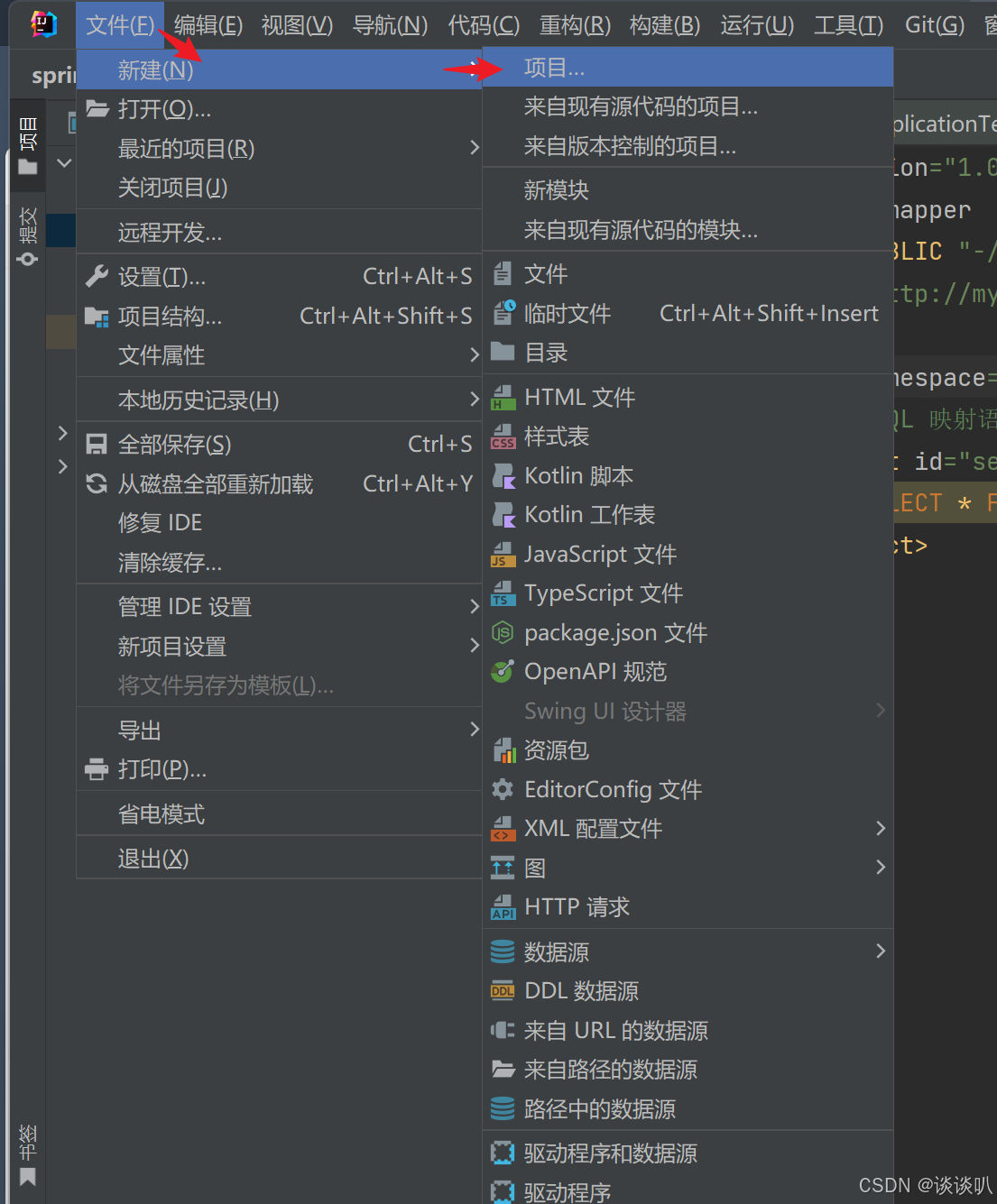
在 IDEA 中创建新项目时,选择 Spring Initializr 模板。确保勾选以下依赖:

  1. Spring Web:用于构建 RESTful API。
  2. MyBatis Framework:持久层框架支持。
  3. MySQL Driver:数据库驱动。
  4. Lombok(可选):简化实体类编写。

设置文件编码统一为 UTF-8,检查 Maven 构建目录结构是否符合预期。若未自动生成 pom.xml,可右键点击项目根目录执行 "Maven" -> "Reload Project"。

配置文件说明

在 application.properties 或 application.yml 中配置数据库连接信息。注意 MyBatis 映射文件路径需与实际资源位置一致。

# 应用服务端口
server.port=9090

# 数据库配置
spring.datasource.driver-class-name=com.mysql.cj.jdbc.Driver
spring.datasource.username=root
spring.datasource.password=123456
spring.datasource.url=jdbc:mysql://localhost:3306/userdb?useSSL=false&serverTimezone=UTC

# MyBatis 配置
mybatis.mapper-locations=classpath:mapper/*.xml
mybatis.configuration.map-underscore-to-camel-case=true
mybatis.configuration.log-impl=org.apache.ibatis.logging.stdout.StdOutImpl

四、集成 MyBatis 编写接口

接下来我们实现一个简单的用户列表查询接口,采用经典的 Controller-Service-Mapper 分层架构。

1. 统一返回结果封装

为了规范前后端交互,建议定义通用的 Result 类。

package com.example.springboot.common;

public class Result {
    private Integer code;      // 状态码
    private String message;    
     Object data;       

      Result  {
            ();
        result.setCode();
        result.setMessage();
         result;
    }

      Result  {
           success();
        result.setData(data);
         result;
    }

      Result  {
            ();
        result.setCode();
        result.setMessage();
         result;
    }

    
     Integer  {  code; }
       { .code = code; }
     String  {  message; }
       { .message = message; }
     Object  {  data; }
       { .data = data; }
}
// 消息提示
private
// 返回数据
public
static
success
()
Result
result
=
new
Result
200
"请求成功"
return
public
static
success
(Object data)
Result
result
=
return
public
static
error
()
Result
result
=
new
Result
500
"请求失败"
return
// Getters and Setters
public
getCode
()
return
public
void
setCode
(Integer code)
this
public
getMessage
()
return
public
void
setMessage
(String message)
this
public
getData
()
return
public
void
setData
(Object data)
this

2. 实体类定义

实体类命名建议遵循 Java 规范(首字母大写),字段名与数据库列对应。

package com.example.springboot.entity;

import org.apache.ibatis.annotations.Mapper;

@Mapper
public class User {
    private String userID;
    private String userName;
    private String userPassword;
    private Integer userAge;

    // Getters and Setters
    public String getUserID() { return userID; }
    public void setUserID(String userID) { this.userID = userID; }
    public String getUserName() { return userName; }
    public void setUserName(String userName) { this.userName = userName; }
    public String getUserPassword() { return userPassword; }
    public void setUserPassword(String userPassword) { this.userPassword = userPassword; }
    public Integer getUserAge() { return userAge; }
    public void setUserAge(Integer userAge) { this.userAge = userAge; }
}

3. Mapper 接口与 XML 映射

定义 Mapper 接口,并在对应的 XML 文件中编写 SQL 语句。

package com.example.springboot.mapper;

import com.example.springboot.entity.User;
import java.util.List;

public interface UserMapper {
    List<User> selectAll();
}

XML 映射文件 (UserMapper.xml):

<?xml version="1.0" encoding="UTF-8" ?>
<!DOCTYPE mapper PUBLIC "-//mybatis.org//DTD Mapper 3.0//EN" "http://mybatis.org/dtd/mybatis-3-mapper.dtd">
<mapper namespace="com.example.springboot.mapper.UserMapper">
    <select id="selectAll" resultType="com.example.springboot.entity.User">
        SELECT * FROM user_list
    </select>
</mapper>

提示:安装 IDEA 插件 MyBatisX 可以更方便地查看 Mapper 方法与 XML 的关联关系。

4. Service 层实现

业务逻辑层负责调用 Mapper 并处理业务规则。

package com.example.springboot.service;

import com.example.springboot.mapper.UserMapper;
import com.example.springboot.entity.User;
import jakarta.annotation.Resource;
import org.springframework.stereotype.Service;
import java.util.List;

@Service
public class UserService {
    @Resource
    private UserMapper userMapper;

    public List<User> selectAll() {
        return userMapper.selectAll();
    }
}

5. Controller 层暴露接口

控制层接收请求并返回统一格式的结果。

package com.example.springboot.controller;

import com.example.springboot.common.Result;
import com.example.springboot.service.UserService;
import com.example.springboot.entity.User;
import jakarta.annotation.Resource;
import org.springframework.web.bind.annotation.GetMapping;
import org.springframework.web.bind.annotation.RequestMapping;
import org.springframework.web.bind.annotation.RestController;
import java.util.List;

@RestController
@RequestMapping("/user")
public class UserController {
    @Resource
    private UserService userService;

    @GetMapping("/selectAll")
    public Result selectAll() {
        List<User> list = userService.selectAll();
        return Result.success(list);
    }
}

6. 启动配置

在主启动类上添加 @MapperScan 注解,指定 Mapper 接口的扫描路径,避免在每个 Mapper 接口上加 @Mapper 注解。

@SpringBootApplication
@MapperScan("com.example.springboot.mapper")
public class Application {
    public static void main(String[] args) {
        SpringApplication.run(Application.class, args);
    }
}

完成上述配置后,启动项目即可访问 http://localhost:9090/user/selectAll 获取用户列表数据。

目录

  1. 一、项目概述
  2. 二、项目结构
  3. 三、初始化项目
  4. 配置文件说明
  5. 应用服务端口
  6. 数据库配置
  7. MyBatis 配置
  8. 四、集成 MyBatis 编写接口
  9. 1. 统一返回结果封装
  10. 2. 实体类定义
  11. 3. Mapper 接口与 XML 映射
  12. 4. Service 层实现
  13. 5. Controller 层暴露接口
  14. 6. 启动配置

更多推荐文章

查看全部
  • Windows 部署 OpenClaw:本地 AI 助手搭建与公网访问指南
  • Linux 进程间通信进阶:管道与共享内存实战
  • 近端策略优化算法 (PPO) 原理与 PyTorch 实现详解
  • 国内环境升级 GitHub Copilot 专业版支付方案
  • 基于腾讯云轻量应用服务器部署 OpenClaw 并接入 QQ 与飞书机器人
  • OpenClaw 多节点访问 Gateway 的配置方法
  • 华三(H3C)交换机基本运维命令及配置案例
  • C++ unordered_set 与 unordered_map 核心解析
  • C 语言常用算法与数据结构基础
  • Python 列表转 Excel 实战:一维、二维与字典格式
  • LangGraph 进阶:构建 ReACT 架构智能 Agent
  • DeepSeek R1 十大核心玩法与本地部署指南
  • 基于 Java SpringBoot+Vue 的海洋生物管理系统设计与实现
  • 学术论文降低 AI 检测率的实操方法与工具推荐
  • VSCode 关闭 Copilot 代码 AI 补全
  • 数据结构:单链表详解与 C 语言实现
  • Windows 安装 Python 后 CMD 命令行无法识别命令
  • Spring Boot 安全认证与授权实战
  • 深度评测 GLM-5:代码生成实战体验
  • 大型语言模型微调入门指南

相关免费在线工具

  • Keycode 信息

    查找任何按下的键的javascript键代码、代码、位置和修饰符。 在线工具,Keycode 信息在线工具,online

  • Escape 与 Native 编解码

    JavaScript 字符串转义/反转义;Java 风格 \uXXXX(Native2Ascii)编码与解码。 在线工具,Escape 与 Native 编解码在线工具,online

  • JavaScript / HTML 格式化

    使用 Prettier 在浏览器内格式化 JavaScript 或 HTML 片段。 在线工具,JavaScript / HTML 格式化在线工具,online

  • JavaScript 压缩与混淆

    Terser 压缩、变量名混淆,或 javascript-obfuscator 高强度混淆(体积会增大)。 在线工具,JavaScript 压缩与混淆在线工具,online

  • Base64 字符串编码/解码

    将字符串编码和解码为其 Base64 格式表示形式即可。 在线工具,Base64 字符串编码/解码在线工具,online

  • Base64 文件转换器

    将字符串、文件或图像转换为其 Base64 表示形式。 在线工具,Base64 文件转换器在线工具,online