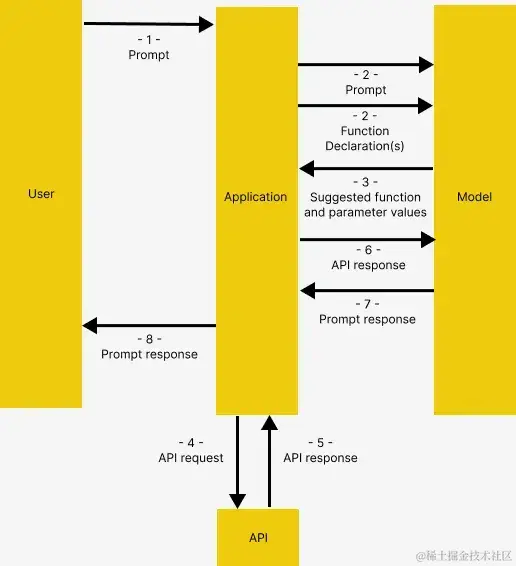
首先连接 OpenRouter。如果有 OpenAI API 密钥,也可以使用原始的 OpenAIChatGenerator 而不重写覆盖 api_base_url 参数。
import os
from dotenv import load_dotenv
from haystack.components.generators.chat import OpenAIChatGenerator
from haystack.utils import Secret
from haystack.dataclasses import ChatMessage
from haystack.components.generators.utils import print_streaming_chunk

# Set your API key as environment variable before executing this
load_dotenv()
OPENROUTER_API_KEY = os.environ.get('OPENROUTER_API_KEY')

chat_generator = OpenAIChatGenerator(
    api_key=Secret.from_env_var("OPENROUTER_API_KEY"),
    api_base_url="https://openrouter.ai/api/v1",
    model="openai/gpt-4-turbo-preview",
    streaming_callback=print_streaming_chunk
)
接下来,我们测试 chat_generator 是否能成功调用。
chat_generator.run(messages=[ChatMessage.from_user("Return this text: 'test'")])
from haystack import Pipeline, Document
from haystack.document_stores.in_memory import InMemoryDocumentStore
from haystack.components.writers import DocumentWriter
from haystack.components.embedders import SentenceTransformersDocumentEmbedder

# Sample documents
documents = [
    Document(content="Coffee shop opens at 9am and closes at 5pm."),
    Document(content="Gym room opens at 6am and closes at 10pm.")
]

# Create the document store
document_store = InMemoryDocumentStore()

# Create a pipeline to turn the texts into embeddings and store them in the document store
indexing_pipeline = Pipeline()
indexing_pipeline.add_component(
    "doc_embedder", SentenceTransformersDocumentEmbedder(model="sentence-transformers/all-MiniLM-L6-v2")
)
indexing_pipeline.add_component("doc_writer", DocumentWriter(document_store=document_store))

indexing_pipeline.connect("doc_embedder.documents", "doc_writer.documents")

indexing_pipeline.run({"doc_embedder": {"documents": documents}})
from haystack.components.embedders import SentenceTransformersTextEmbedder
from haystack.components.retrievers.in_memory import InMemoryEmbeddingRetriever
from haystack.components.builders import PromptBuilder
from haystack.components.generators import OpenAIGenerator

template = """
Answer the questions based on the given context.

Context:
{% for document in documents %}
    {{ document.content }}
{% endfor %}
Question: {{ question }}
Answer:
"""
rag_pipe = Pipeline()
rag_pipe.add_component("embedder", SentenceTransformersTextEmbedder(model="sentence-transformers/all-MiniLM-L6-v2"))
rag_pipe.add_component("retriever", InMemoryEmbeddingRetriever(document_store=document_store))
rag_pipe.add_component("prompt_builder", PromptBuilder(template=template))
# Note to llm: We are using OpenAIGenerator, not the OpenAIChatGenerator, because the latter only accepts List[str] as input and cannot accept prompt_builder's str output
rag_pipe.add_component("llm", OpenAIGenerator(api_key=Secret.from_env_var("OPENROUTER_API_KEY"),
  api_base_url="https://openrouter.ai/api/v1",
  model="openai/gpt-4-turbo-preview"))

rag_pipe.connect("embedder.embedding", "retriever.query_embedding")
rag_pipe.connect("retriever", "prompt_builder.documents")
rag_pipe.connect("prompt_builder", "llm")
测试函数功能是否正常工作。
query = "When does the coffee shop open?"
rag_pipe.run({"embedder": {"text": query}, "prompt_builder": {"question": query}})
# Flask's default local URL, change it if necessary
db_base_url = 'http://127.0.0.1:5000'# Use requests to get the data from the databaseimport requests
import json
# get_categories is supplied as part of the prompt, it is not used as a tooldefget_categories():
response = requests.get(f'{db_base_url}/category')
data = response.json()
return data
defget_items(ids=None, categories=None):
params = {
'id': ids,
'category': categories,
}
response = requests.get(f'{db_base_url}/item', params=params)
data = response.json()
return data
defpurchase_item(id, quantity):
headers = {
'Content-type': 'application/json',
'Accept': 'application/json'
}
data = {
'id': id,
'quantity': quantity,
}
response = requests.post(f'{db_base_url}/item/purchase', json=data, headers=headers)
return response.json()
tools = [
    {
        "type": "function",
        "function": {
            "name": "get_items",
            "description": "Get a list of items from the database",
            "parameters": {
                "type": "object",
                "properties": {
                    "ids": {
                        "type": "string",
                        "description": "Comma separated list of item ids to fetch",
                    },
                    "categories": {
                        "type": "string",
                        "description": "Comma separated list of item categories to fetch",
                    },
                },
                "required": [],
            },
        }
    },
    {
        "type": "function",
        "function": {
            "name": "purchase_item",
            "description": "Purchase a particular item",
            "parameters": {
                "type": "object",
                "properties": {
                    "id": {
                        "type": "string",
                        "description": "The given product ID, product name is not accepted here. Please obtain the product ID from the database first.",
                    },
                    "quantity": {
                        "type": "integer",
                        "description": "Number of items to purchase",
                    },
                },
                "required": [],
            },
        }
    },
    {
        "type": "function",
        "function": {
            "name": "rag_pipeline_func",
            "description": "Get information from hotel brochure",
            "parameters": {
                "type": "object",
                "properties": {
                    "query": {
                        "type": "string",
                        "description": "The query to use in the search. Infer this from the user's message. It should be a question or a statement",
                    }
                },
                "required": ["query"],
            },
        }
    }
]
# 1. Initial prompt
context = f"""You are an assistant to tourists visiting a hotel.
You have access to a database of items (which includes {get_categories()}) that tourists can buy, you also have access to the hotel's brochure.
If the tourist's question cannot be answered from the database, you can refer to the brochure.
If the tourist's question cannot be answered from the brochure, you can ask the tourist to ask the hotel staff.
"""
messages = [
    ChatMessage.from_system(context),
    # 2. Sample message from user
    ChatMessage.from_user("Can I buy a coffee?"),
]

# 3. Passing the tools list and invoke the chat generator
response = chat_generator.run(messages=messages, generation_kwargs={"tools": tools})
response
## Find the correspoding function and call it with the given arguments
available_functions = {"get_items": get_items, "purchase_item": purchase_item, "rag_pipeline_func": rag_pipeline_func}
function_to_call = available_functions[function_name]
function_response = function_to_call(**function_args)
print("Function Response:", function_response)
Function Response: {'reply': 'The provided context does not specify a physical location for the coffee shop, only its operating hours. Therefore, I cannot determine where the coffee shop is located based on the given information.'}
import json
from haystack.dataclasses import ChatMessage, ChatRole
response = None
messages = [
ChatMessage.from_system(context)
]
whileTrue:
# if OpenAI response is a tool callif response and response["replies"][0].meta["finish_reason"] == "tool_calls":
function_calls = json.loads(response["replies"][0].content)
for function_call in function_calls:
## Parse function calling information
function_name = function_call["function"]["name"]
function_args = json.loads(function_call["function"]["arguments"])
## Find the correspoding function and call it with the given arguments
function_to_call = available_functions[function_name]
function_response = function_to_call(**function_args)
## Append function response to the messages list using `ChatMessage.from_function`
messages.append(ChatMessage.from_function(content=json.dumps(function_response), name=function_name))
# Regular Conversationelse:
# Append assistant messages to the messages listifnot messages[-1].is_from(ChatRole.SYSTEM):
messages.append(response["replies"][0])
user_input = input("ENTER YOUR MESSAGE 👇 INFO: Type 'exit' or 'quit' to stop\n")
if user_input.lower() == "exit"or user_input.lower() == "quit":
breakelse:
messages.append(ChatMessage.from_user(user_input))
response = chat_generator.run(messages=messages, generation_kwargs={"tools": tools})
在集成开发环境中运行交互式聊天 App。
尽管基本的交互方式也可以运行使用,但拥有一个更加美观友好的用户界面会让用户体验更加出色。
Streamlit 界面
Streamlit 能够将 Python 脚本和 Web 开发技术优雅地结合,转化为可共享使用的 Web 服务应用,为这个函数调用交互式应用程序构建了一个全新的 Web 界面。上述代码已被改编成一个 Streamlit 应用,位于代码仓库的 streamlit 文件夹中。
我们可以通过以下步骤运行该应用:
如果还未运行,请使用 python db_api.py 启动 API 服务器。
将 OPENROUTER_API_KEY 设置为环境变量,例如在 Linux 上或使用 git bash 时,执行 export OPENROUTER_API_KEY='@替换为您的 API 密钥'。
在终端中进入 streamlit 文件夹,目录切换命令为 cd streamlit。
运行 streamlit run app.py 启动 Streamlit。浏览器应该会自动创建一个新的标签页,运行该应用程序。
总结与展望
本文详细介绍了如何利用 Function Calling 技术构建自主 AI Agent。通过定义工具函数连接数据库和文档存储,结合 Haystack 框架与大语言模型,实现了 Agent 的自主决策与外部交互。
在实际应用中,开发者需要注意以下几点:
工具描述准确性:提供给模型的函数描述必须清晰准确,否则模型可能无法正确选择工具或传递错误参数。
错误处理:在调用外部 API 时应增加异常捕获机制,防止因网络或服务故障导致整个 Agent 崩溃。
上下文管理:随着对话轮数增加,需合理管理历史消息长度,避免超出模型上下文窗口限制。
安全性:对于涉及敏感操作(如支付、删除数据)的函数,应增加权限验证环节,确保只有授权操作才能执行。
通过掌握 Function Calling 技术,开发者可以更灵活地扩展大模型的能力边界,构建出真正具备实用价值的智能应用。未来,随着多模态能力的增强,Agent 将能处理更复杂的任务场景,成为人机协作的重要桥梁。