对于权重与激活量化,Integer or Floating Point? New Outlooks for Low-Bit Quantization on Large Language Models 中统计了 LLaMA-65B 各层权重的 Per Channel 量化后的偏差,并对结果进行了排序,结果表明 INT8 在所有层的权重量化的精度方面要明显好于 FP8-E4。
同时,Integer or Floating Point? New Outlooks for Low-Bit Quantization on Large Language Models 中针对不同位宽(INT/FP)的运算进行比较,如加法器、乘法器、乘法累加运算单元(multiply-accumulate (MAC))。对于 8 位 MAC,乘法器为 8 位,累加器为 16 位,以防止溢出。
对于在 DNN 中作为矩阵乘法的基本构建块的 MAC 单元,FP 运算通常比 INT 运算需要更多的面积。然而,这种差异随着位宽的减小而缩小。有趣的是,在 8 位时,FP8 和 INT8 MAC 单元的面积要求几乎相同。这一观察结果表明 INT8 和 FP8 表现出相似的硬件成本和推理性能。与 H800 等 GPU 的硬件参数一致。
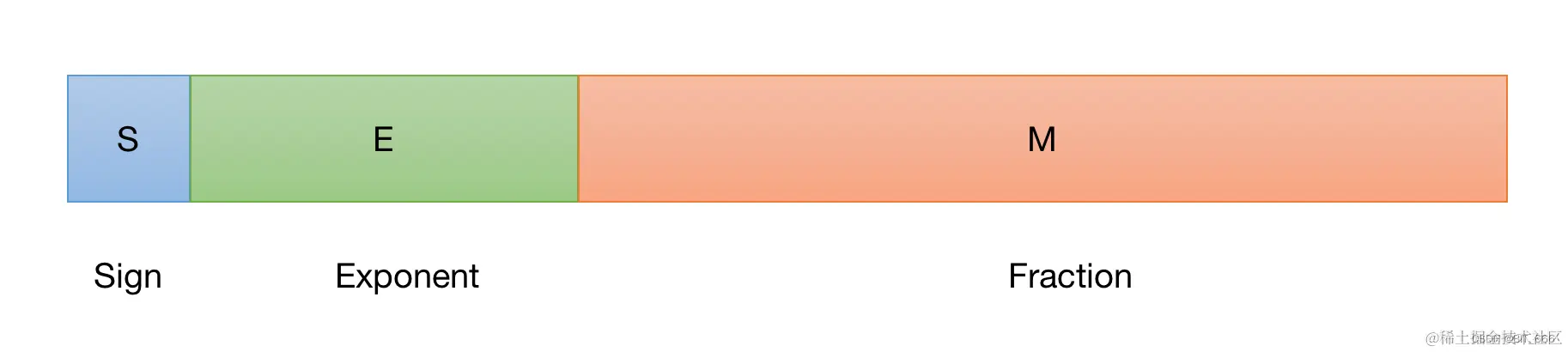
INT 的量化步长是均匀的,总是以一定的步长完成量化,这是一种均匀的量化。而浮点的量化则是非均匀的,随着数值增大,其步长也在逐渐变大。且 E5M2 的步长变化较 E4M3 而言更加明显。从另一个角度出发,量化的误差总是与步长正相关的,因此FP8 浮点量化相比于 INT8 而言,对于小数来说会更加精确,但对于大数则更不精确。
FP8 量化方案
FP8 量化模拟
来自高通 AI 研究院的论文 FP8 Quantization: The Power of the Exponent通过对 FP8 量化格式的深入分析,包括理论基础和实验验证。提出了一种一种在 FP32 硬件中模拟 FP8 量化的新方法,该方法可加快 FP8 量化模拟速度,同时很容易地在常见的深度学习框架中实现,有助于快速进行 PTQ 和 QAT,并且它暴露了 FP8 量化器的参数(即尾数/指数位和指数偏置值),允许通过反向传播学习这些参数。
上海交通大学、北京大学和微软亚洲研究院联合发布的论文 Integer or Floating Point? New Outlooks for Low-Bit Quantization on Large Language Models 中对 INT 和 FP 量化进行了比较分析,发现不同层的最佳量化格式因张量分布的复杂性和多样性而异,没有一种量化格式在所有情况下都始终优于其他量化格式,从而提出了一种混合格式量化方法(Mixture of Formats Quantization (MoFQ))。该方法逐层(layer-wise)选择最优的量化格式,以最小的精度损失实现 W8A8 量化结果。无论是仅权重还是权重激活量化场景中都取得了良好的效果。
from vllm import LLM
model = LLM("facebook/opt-125m", quantization="fp8")
# INFO 06-10 17:55:42 model_runner.py:157] Loading model weights took 0.1550 GB
result = model.generate("Hello, my name is")
from auto_fp8 import AutoFP8ForCausalLM, BaseQuantizeConfig
pretrained_model_dir = "meta-llama/Meta-Llama-3-8B-Instruct"
quantized_model_dir = "Meta-Llama-3-8B-Instruct-FP8-Dynamic"# 使用动态激活 scales 定义量化配置
quantize_config = BaseQuantizeConfig(quant_method="fp8", activation_scheme="dynamic")
# For dynamic activation scales, there is no need for calbration examples
examples = []
# Load the model, quantize, and save checkpoint
model = AutoFP8ForCausalLM.from_pretrained(pretrained_model_dir, quantize_config)
model.quantize(examples)
model.save_quantized(quantized_model_dir)
其输出日志中可以看到模型定义中线性模型被替换为量化线性模块 (FP8DynamicLinear),注意,当前默认情况下会跳过末尾的 lm_head Linear 模块。
from vllm import LLM
model = LLM(model="Meta-Llama-3-8B-Instruct-FP8-Dynamic/")
# INFO 06-10 21:15:41 model_runner.py:159] Loading model weights took 8.4596 GB
result = model.generate("Hello, my name is")
from datasets import load_dataset
from transformers import AutoTokenizer
from auto_fp8 import AutoFP8ForCausalLM, BaseQuantizeConfig

pretrained_model_dir = "meta-llama/Meta-Llama-3-8B-Instruct"
quantized_model_dir = "Meta-Llama-3-8B-Instruct-FP8"

tokenizer = AutoTokenizer.from_pretrained(pretrained_model_dir, use_fast=True)
tokenizer.pad_token = tokenizer.eos_token

# Load and tokenize 512 dataset samples for calibration of activation scales
ds = load_dataset("mgoin/ultrachat_2k", split="train_sft").select(range(512))
examples = [tokenizer.apply_chat_template(batch["messages"], tokenize=False) for batch in ds]
examples = tokenizer(examples, padding=True, truncation=True, return_tensors="pt").to("cuda")

# 使用静态激活 scales 定义量化配置
quantize_config = BaseQuantizeConfig(quant_method="fp8", activation_scheme="static")

# Load the model, quantize, and save checkpoint
model = AutoFP8ForCausalLM.from_pretrained(pretrained_model_dir, quantize_config)
model.quantize(examples)
model.save_quantized(quantized_model_dir)
最后,直接在 vLLM 中加载量化模型检查点即可使用。
from vllm import LLM
model = LLM(model="Meta-Llama-3-8B-Instruct-FP8/")
# INFO 06-10 21:15:41 model_runner.py:159] Loading model weights took 8.4596 GB
result = model.generate("Hello, my name is")
from vllm import LLM, SamplingParams
# Sample prompts.
prompts = [
"Hello, my name is",
"The president of the United States is",
"The capital of France is",
"The future of AI is",
]
# Create a sampling params object.
sampling_params = SamplingParams(temperature=0.8, top_p=0.95)
# Create an LLM.
llm = LLM(model="facebook/opt-125m", kv_cache_dtype="fp8")
# 根据提示生成文本。输出是一个 RequestOutput 对象列表,其中包含提示、生成的文本和其他信息。
outputs = llm.generate(prompts, sampling_params)
# Print the outputs.for output in outputs:
prompt = output.prompt
generated_text = output.outputs[0].text
print(f"Prompt: {prompt!r}, Generated text: {generated_text!r}")
from vllm import LLM, SamplingParams
sampling_params = SamplingParams(temperature=1.3, top_p=0.8)
llm = LLM(model="meta-llama/Llama-2-7b-chat-hf",
kv_cache_dtype="fp8",
quantization_param_path="./tests/fp8_kv/llama2-7b-fp8-kv/kv_cache_scales.json")
prompt = "London is the capital of"
out = llm.generate(prompt, sampling_params)[0].outputs[0].text
print(out)
# output w/ scaling factors: England, the United Kingdom, and one of the world's leading financial,# output w/o scaling factors: England, located in the southeastern part of the country. It is known
FP8 在不同推理框架及硬件的性能对比
在 TensorRT-LLM 使用 FP8 性能测试如下表所示。其中,FP16 的 max 值为 75,而 FP8 的 max 值则提升至 85。原因是 FP8 节省了权重部分的内存,但部分 tensor 以及 KV cache 仍保持在 FP16。表格最后一列展示了使用 FP8 KV cache 的情况,此时能够看到其 max 值相比 FP16 的 max 值超出 2 倍。