
跳到主要内容
极客日志极客日志面向AI+效率的开发者社区
首页博客我的书AI学习GitHub 精选镜像AI 生图工具UI配色美学关于
搜索内容 / 工具 / 仓库 / 镜像...⌘K搜索
注册
博客列表
C#

WPF 中使用 ListView 封装组合控件 TreeView+DataGrid

WPF 原生控件封装方案通过 ListView 实现 TreeView 与 DataGrid 的组合功能。文章对比了三种技术路径,重点演示基于 ListView 的实现方法,包含核心类 TreeList 代码及样式配置,解决了第三方收费控件的使用问题,提供原生免费替代方案。

邪神洛基发布于 2025/2/5更新于 2026/9/3095 浏览
WPF 中使用 ListView 封装组合控件 TreeView+DataGrid

WPF 的功能非常强大,很多控件都是原生的,但是要使用 TreeView+DataGrid 的组合,就需要我们自己去封装实现。

我们需要的效果如图所示:
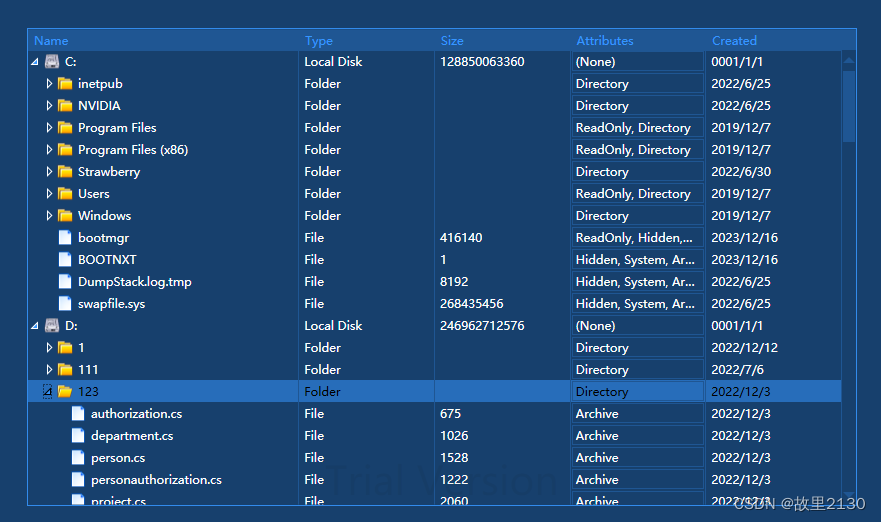
WPF ListView 封装组合控件示例

WPF ListView 封装组合控件示例

这两个图都是第三方控件自带的,并且都是收费使用。现在我们就用原生的控件进行封装一个。

功能如上图所示,目前基本上把常用的样式都实现了。

首先说明一下,实现上面的效果,有 3 种方法:

  1. 技术的选择是 TreeView。
  2. 技术的选择是 DataGrid。
  3. 技术的选择是 ListView(也就是本文的演示)。

本文演示的是 ListView 的实现。

1. 首先建立一个 WPF 程序

2. 封装 TreeList.cs

namespace ListView.TreeDataGrid
{
    using System;
    using System.Collections;
    using System.Collections.Generic;
    using System.Collections.ObjectModel;
    using System.Collections.Specialized;
    using System.Linq;
    using System.Windows;
    using System.Windows.Controls;
    using System.Windows.Controls.Primitives;

    public class TreeList : ListView
    {
        #region Properties

        /// <summary>
        /// Internal collection of rows representing visible nodes, actually displayed in the ListView
        /// 
         ObservableCollectionAdv<TreeNode> Rows
        {
            ;  ;
        }

         ITreeModel _model;
         ITreeModel Model
        {
             {  _model; }
            
            {
                 (_model != )
                {
                    _model = ;
                    _root.Children.Clear();
                    Rows.Clear();
                    CreateChildrenNodes(_root);
                }
            }
        }

         TreeNode _root;
         TreeNode Root
        {
             {  _root; }
        }

        
        {
             {  Root.Nodes; }
        }

         TreeNode PendingFocusNode
        {
            ; ;
        }

        
        {
            
            {
                 SelectedItems.Cast<TreeNode>().ToArray();
            }
        }

         TreeNode SelectedNode
        {
            
            {
                 (SelectedItems.Count > )
                     SelectedItems[]  TreeNode;
                
                     ;
            }
        }


        {
            Rows =  ObservableCollectionAdv<TreeNode>();
            _root =  TreeNode(, );
            _root.IsExpanded = ;
            ItemsSource = Rows;
            ItemContainerGenerator.StatusChanged += ItemContainerGeneratorStatusChanged;
        }

        
        {
             (ItemContainerGenerator.Status == GeneratorStatus.ContainersGenerated && PendingFocusNode != )
            {
                 item = ItemContainerGenerator.ContainerFromItem(PendingFocusNode)  TreeListItem;
                 (item != )
                    item.Focus();
                PendingFocusNode = ;
            }
        }

        
        {
              TreeListItem();
        }

        
        {
             item  TreeListItem;
        }

        
        {
             ti = element  TreeListItem;
             node = item  TreeNode;
             (ti !=  && node != )
            {
                ti.Node = item  TreeNode;
                .PrepareContainerForItemOverride(element, node.Tag);
            }
        }

        
        {
             ()
            {
                 (!node.IsExpandedOnce)
                {
                    node.IsExpandedOnce = ;
                    node.AssignIsExpanded();
                    CreateChildrenNodes(node);
                }
                
                {
                    node.AssignIsExpanded();
                    CreateChildrenRows(node);
                }
            }
            
            {
                DropChildrenRows(node, );
                node.AssignIsExpanded();
            }
        }

        
        {
             children = GetChildren(node);
             (children != )
            {
                 rowIndex = Rows.IndexOf(node);
                node.ChildrenSource = children  INotifyCollectionChanged;
                 ( obj  children)
                {
                    TreeNode child =  TreeNode(, obj);
                    child.HasChildren = HasChildren(child);
                    node.Children.Add(child);
                }
                Rows.InsertRange(rowIndex + , node.Children.ToArray());
            }
        }

        
        {
             index = Rows.IndexOf(node);
             (index >=  || node == _root) 
            {
                 nodes = node.AllVisibleChildren.ToArray();
                Rows.InsertRange(index + , nodes);
            }
        }

        
        {
             start = Rows.IndexOf(node);
             (start >=  || node == _root) 
            {
                 count = node.VisibleChildrenCount;
                 (removeParent)
                    count++;
                
                    start++;
                Rows.RemoveRange(start, count);
            }
        }

        
        {
             (Model != )
                 Model.GetChildren(parent.Tag);
            
                 ;
        }

        
        {
             (parent == Root)
                 ;
              (Model != )
                 Model.HasChildren(parent.Tag);
            
                 ;
        }

        
        {
            TreeNode node =  TreeNode(, tag);
             (index >=  && index < parent.Children.Count)
                parent.Children.Insert(index, node);
            
            {
                index = parent.Children.Count;
                parent.Children.Add(node);
            }
            Rows.Insert(rowIndex + index + , node);
        }
    }
}

目录

  1. 1. 首先建立一个 WPF 程序
  2. 2. 封装 TreeList.cs
  3. 3. TreeStyles.xaml
  4. 4. 最终源码实例

更多推荐文章

查看全部
  • Python 机器人避障算法实战:掌握 5 种核心算法与智能路径规划
  • LLaMA-Factory 大模型 LoRA 微调实战指南
  • Python 处理 Markdown 文件:生成、转换与解析实战
  • Spring AI 实战:Prompt 优化、应用开发与核心特性详解
  • C++11 手写 Promise 实现及与 std::promise 对比
  • 宇树机器人 G1 二次开发:FAST_LIO 建图与 RViz 配置教程
  • Ubuntu 服务器安装 lrzsz 工具实现文件传输
  • Seedance 2.0 双分支扩散变换器架构解析与工程实现
  • 金仓 KingbaseES 融合架构实践:告别多库并存,实现一库多能
  • SDF 反标 Warning 描述与解决方案
  • Open WebUI MCPo 技术解析:MCP 协议转 OpenAPI 代理服务器
  • C++ 多容器非空检查的逻辑陷阱与最佳实践
  • Java Web 会话管理:Cookie 实战详解
  • 微信群机器人怎么配置和进群
  • 最大公约数 (GCD) 与最小公倍数 (LCM) 计算方法详解
  • 基于 Python 与 Stable Diffusion 的马年新春营销素材生成实战
  • Lada v0.11.0 更新:AI 视频去马赛克工具支持 Nvidia 与 Intel Arc
  • Spring Boot 接入淘宝猫超卡 TopAPI 经验记录
  • CATE 条件平均处理效应估计:五大方法原理详解与 Python 实战
  • 无人机 SLAM 单目深度先验融合实践:基于 lingbot-depth 模型

相关免费在线工具

  • Base64 字符串编码/解码

    将字符串编码和解码为其 Base64 格式表示形式即可。 在线工具,Base64 字符串编码/解码在线工具,online

  • Base64 文件转换器

    将字符串、文件或图像转换为其 Base64 表示形式。 在线工具,Base64 文件转换器在线工具,online

  • Markdown转HTML

    将 Markdown(GFM)转为 HTML 片段,浏览器内 marked 解析;与 HTML转Markdown 互为补充。 在线工具,Markdown转HTML在线工具,online

  • HTML转Markdown

    将 HTML 片段转为 GitHub Flavored Markdown,支持标题、列表、链接、代码块与表格等;浏览器内处理,可链接预填。 在线工具,HTML转Markdown在线工具,online

  • JSON 压缩

    通过删除不必要的空白来缩小和压缩JSON。 在线工具,JSON 压缩在线工具,online

  • JSON美化和格式化

    将JSON字符串修饰为友好的可读格式。 在线工具,JSON美化和格式化在线工具,online

</summary>
internal
get
private
set
private
public
get
return
set
if
value
value
private
internal
get
return
public ReadOnlyCollection<TreeNode> Nodes
get
return
internal
get
set
public ICollection<TreeNode> SelectedNodes
get
return
public
get
if
0
return
0
as
else
return
null
#endregion
public TreeList()
new
new
this
null
true
void ItemContainerGeneratorStatusChanged(object sender, EventArgs e)
if
null
var
as
if
null
null
protected override DependencyObject GetContainerForItemOverride()
return
new
protected override bool IsItemItsOwnContainerOverride(object item)
return
is
protected override void PrepareContainerForItemOverride(DependencyObject element, object item)
var
as
var
as
if
null
null
as
base
internal void SetIsExpanded(TreeNode node, bool value)
if
value
if
true
value
else
value
else
false
value
internal void CreateChildrenNodes(TreeNode node)
var
if
null
int
as
foreach
object
in
new
this
1
private void CreateChildrenRows(TreeNode node)
int
if
0
// ignore invisible nodes
var
1
internal void DropChildrenRows(TreeNode node, bool removeParent)
int
if
0
// ignore invisible nodes
int
if
else
private IEnumerable GetChildren(TreeNode parent)
if
null
return
else
return
null
private bool HasChildren(TreeNode parent)
if
return
true
else
if
null
return
else
return
false
internal void InsertNewNode(TreeNode parent, object tag, int rowIndex, int index)
new
this
if
0
else
1

3. TreeStyles.xaml

<ResourceDictionary xmlns="http://schemas.microsoft.com/winfx/2006/xaml/presentation"
                    xmlns:x="http://schemas.microsoft.com/winfx/2006/xaml"
                     xmlns:local="clr-namespace:ListView.TreeDataGrid"
                   >
    <Style TargetType="{x:Type local:TreeListItem}">
        <Setter Property="IsSelected" Value="{Binding IsSelected, Mode=TwoWay}"/>
        <Style.Triggers>
            <!--隔行换色-->
            <Trigger Property="ListBox.AlternationIndex"  Value="0" >
                <Setter Property="Background" Value="#e7e7e7" />
            </Trigger>
            <Trigger Property="ListBox.AlternationIndex" Value="1" >
                <Setter Property="Background" Value="#f2f2f2" />
            </Trigger>

            <Trigger Property="IsMouseOver" Value="True">
                <Setter Property="Background" Value="Orange"/>
            </Trigger>

            <Trigger Property="IsSelected" Value="True">
                <!--选中的行颜色-->
                <Setter Property="Background" Value="Aqua"/>
            </Trigger>
        </Style.Triggers>
    </Style>

    <Style x:Key="TreeListItemNodeStyle" TargetType="{x:Type local:TreeListItem}" >
        <Setter Property="IsSelected" Value="{Binding IsSelected, Mode=TwoWay}"/>
        <Setter Property="FocusVisualStyle" Value="{x:Null}"/>
        <Setter Property="Template">
            <Setter.Value>
                <ControlTemplate>
                    <ContentPresenter Content="{TemplateBinding ContentControl.Content}" 
                                      ContentTemplate="{TemplateBinding ContentControl.ContentTemplate}" 
                                      HorizontalAlignment="{TemplateBinding Control.HorizontalContentAlignment}" 
                                      VerticalAlignment="{TemplateBinding Control.VerticalContentAlignment}" 
                                      SnapsToDevicePixels="{TemplateBinding UIElement.SnapsToDevicePixels}" />
                    <ControlTemplate.Triggers>
                        <Trigger Property="UIElement.IsEnabled" Value="False">
                            <Setter Property="TextElement.Foreground">
                                <Setter.Value>
                                    <DynamicResource ResourceKey= />


    </Style>
</ResourceDictionary>

4. 最终源码实例

WPF ListView 封装组合控件示例

WPF ListView 封装组合控件示例

说明:使用 ListView 封装的时候,难度最大,或者没有找到最好的方法实现。

"{x:Static SystemColors.GrayTextBrushKey}"
</Setter.Value>
</Setter>
</Trigger>
</ControlTemplate.Triggers>
</ControlTemplate>
</Setter.Value>
</Setter>